
Esta guía técnica explica el Internet Exchange a partir del problema que resuelve: cómo redes independientes intercambian tráfico directamente, dónde se hospeda esa infraestructura y cómo conectar un Sistema Autónomo (AS) a ella. El enfoque es el modelo brasileño de IX.br, operado por el NIC.br, sin perder la visión universal de cómo funcionan los IXPs.
Al final, el lector sabe evaluar si vale la pena participar, elegir la localidad y el PIX, dimensionar el puerto, preparar el enrutamiento y la seguridad, solicitar la adhesión y poner la conexión en producción.
Sobre este material: contenido consolidado a partir de fuentes oficiales (IX.br, docs.ix.br, Registro.br, PeeringDB y RFCs), consultadas en septiembre de 2026. Localidades, PIX, valores, requisitos y políticas cambian — confirme siempre la versión vigente antes de contratar o configurar. Este es un material educativo y no sustituye la documentación contractual ni el proyecto ejecutivo.
Por qué existe el IX
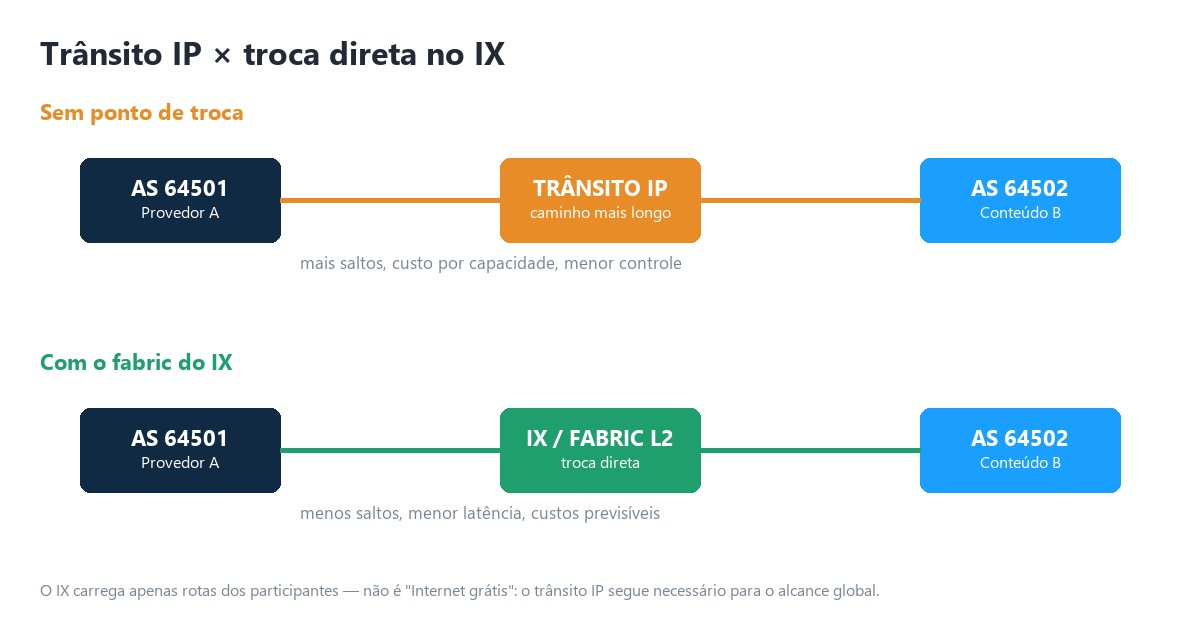
Internet no es una nube única: es una federación de miles de redes independientes — proveedores, clouds, CDNs, empresas, universidades, bancos y gobiernos. Cada red decide cómo alcanzar a las demás. Sin un punto de intercambio, dos redes en la misma ciudad pueden enviar tráfico a través de un proveedor de tránsito y recorrer un camino mayor del necesario.
El motivo real
- Localizar el tráfico: mantener la comunicación regional cerca de los usuarios y del contenido.
- Reducir la dependencia: no concentrar todo el tráfico en un único upstream.
- Mejorar el desempeño: reducir saltos, latencia, jitter y puntos de congestión.
- Mejorar la economía: desplazar tráfico elegible del tránsito pagado hacia relaciones de peering.
- Aumentar la resiliencia: crear caminos adicionales entre redes y ecosistemas locales.
- Estimular el ecosistema: acercar ISPs, contenido, nubes, gobierno, finanzas y educación.
No es "Internet gratis": el IX transporta únicamente rutas disponibilizadas por los participantes. Para alcanzar el resto de Internet, normalmente sigue siendo necesario tránsito IP, peering privado u otras interconexiones.
Cómo funciona el IX
El núcleo de un IX es una red Ethernet de capa 2 — el fabric — distribuida entre puntos físicos. Cada participante conecta un puerto y recibe direcciones de la LAN de peering. Sobre esa LAN, establece sesiones BGP con Route Servers y/o peers bilaterales.
| Plano | Qué sucede |
|---|---|
| Control | El BGP anuncia y selecciona prefijos. Los Route Servers facilitan la distribución de rutas sin necesidad de una sesión con cada participante. |
| Datos | Los paquetes Ethernet van directamente del router de origen al router del peer. El Route Server no queda en la ruta del tráfico. |
Flujo simplificado
- Su router anuncia al Route Server los prefijos autorizados.
- El Route Server valida y exporta esas rutas conforme a políticas y communities.
- Su router aprende rutas de los demás miembros y elige los mejores caminos.
- Para un destino aprendido en el IX, el paquete sale por el puerto del IX y llega directamente a la MAC del peer.
- Las rutas no disponibles en el IX siguen usando tránsito IP u otro camino.
IX, PIX, CIX, transporte y tránsito
| Componente | Función | No confundir con |
|---|---|---|
| IX | Ecosistema y fabric de intercambio en una localidad. | Data center u operadora de tránsito. |
| PIX | Punto físico autorizado conectado al fabric. | El IX entero. |
| CIX | Comparte un puerto del IX entre clientes y entrega acceso lógico. | Route Server. |
| Transporte L2 | Lleva una VLAN/EVC transparente hasta un puerto del IX. | Tránsito IP. |
| Tránsito IP | Entrega tabla completa / default y alcance global. | Peering. |
| PNI | Interconexión privada dedicada entre dos redes. | ATM multilateral. |
Regla de oro: el peering decide con quién intercambiar tráfico; el transporte decide cómo llegar físicamente al IX; el tránsito decide cómo alcanzar el resto de Internet.
Dónde está hospedado el IX.br
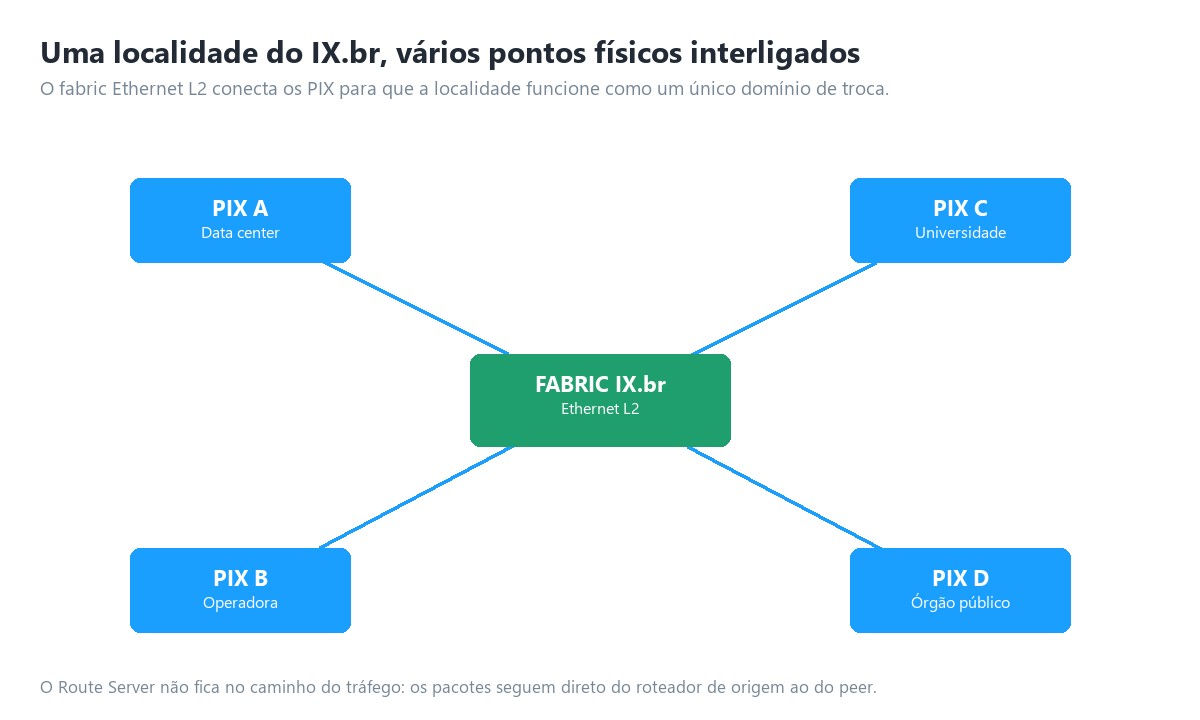
El IX.br está organizado por localidades metropolitanas. Cada localidad puede tener varios PIX, conectados al mismo entorno de intercambio. Los PIX pueden estar hospedados en data centers comerciales, operadoras, universidades, redes académicas, organismos públicos y otras instituciones calificadas.
Estar en el mismo data center de un PIX reduce la complejidad de la última milla, pero no es obligatorio — es posible contratar transporte L2 o un CIX. La documentación oficial consultada en 2026 identifica localidades en casi todos los estados, de Aracaju, Belém y Belo Horizonte a São Paulo, Teresina y Vitória, pasando por Brasília, Campinas, Curitiba, Fortaleza, Manaus, Porto Alegre, Recife, Río de Janeiro y Salvador, entre muchas otras.
Ejemplo de hospedaje distribuido: en Brasília, la lista oficial de PIX incluye instalaciones de data center, RNP, Telebras, Serpro, BR.Digital, SAMM y Eletronet. Otras localidades tienen conjuntos propios de PIX, y el fabric interconecta esos puntos para que la localidad funcione como un único dominio de intercambio. La existencia de una localidad no significa que todos los contenidos estén presentes en ella — antes de contratar, revise participantes, tráfico, políticas de peering y rutas efectivamente disponibles.
Peering bilateral y multilateral
| Modelo | Cómo funciona | Ventajas | Atenciones |
|---|---|---|---|
| Multilateral (ATM) | Una o dos sesiones con Route Servers dan acceso a las rutas de los miembros participantes. | Escala, implementación rápida y amplia conectividad. | Aplicar filtros, communities y seguir los cambios. |
| Bilateral público | Dos redes crean sesiones BGP directamente sobre la LAN del IX. | Política específica e independencia del RS. | Más sesiones y coordinación operativa. |
| PNI privado | Circuito / puerto dedicado entre dos redes. | Capacidad y aislamiento dedicados. | Costo y dependencia del volumen bilateral. |
Cuándo usar cada uno
- Comience por el ATM para capturar rápidamente el valor del ecosistema.
- Agregue sesiones bilaterales cuando la política de un peer lo exija o cuando exista beneficio operativo.
- Evalúe PNI cuando el volumen con una única red justifique un puerto/circuito dedicado, o cuando existan requisitos especiales de capacidad y aislamiento.
Política de peering: cada AS debe documentar si su política es abierta, selectiva o restrictiva; volúmenes mínimos; ubicaciones; capacidad; contactos de NOC; criterios de congestión y reglas de anuncio. Una cuenta en PeeringDB actualizada facilita el descubrimiento y las validaciones del ecosistema.
Route Servers y el camino real del tráfico
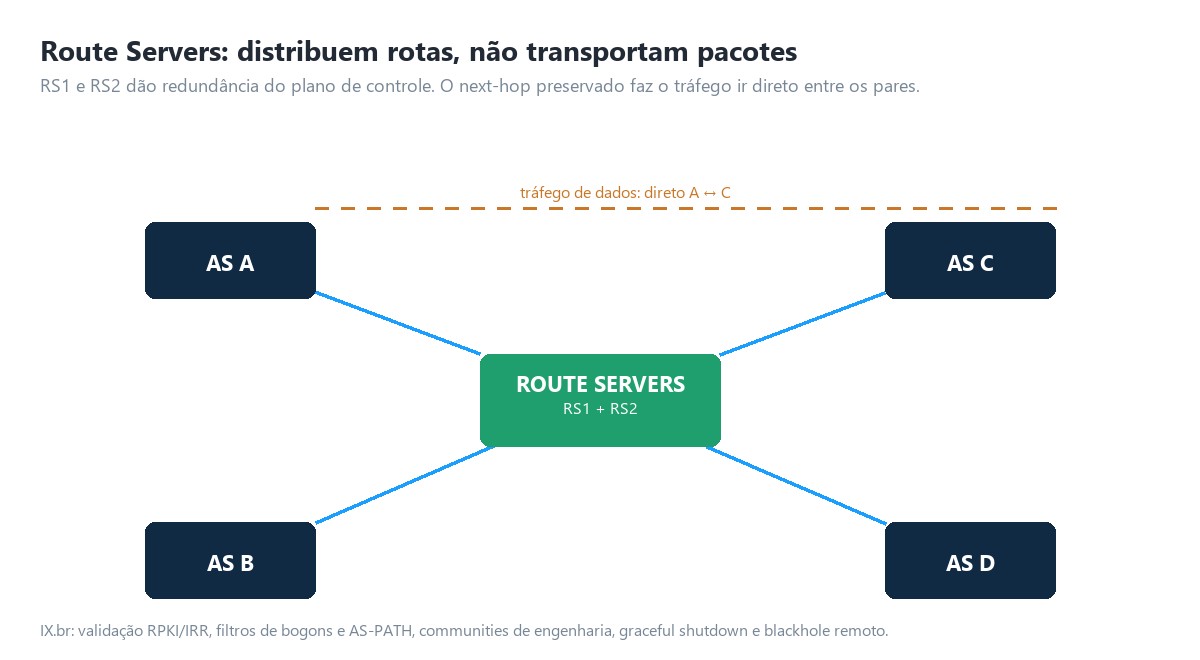
El Route Server recibe rutas de muchos participantes y las redistribuye conforme a la política, preservando el next-hop del originador. Así, su router envía los paquetes directamente al peer. RS1 y RS2 ofrecen redundancia del plano de control, pero no sustituyen la redundancia física del acceso.
Recursos modernos del IX.br
- Validación de origen usando datos de registro, IRR y RPKI.
- Filtros de prefijos, bogons, AS-PATH y protección contra anuncios indebidos.
- Communities para controlar exportación, prepend, localidad, RTT y pérdida.
- Soporte a graceful shutdown para mantenimiento controlado.
- Blackhole remoto para prefijos específicos, conforme a la política vigente.
- Mecanismos para mitigar hidden paths, incluyendo add-path cuando esté soportado.
Atención: la política de communities evoluciona. En julio de 2026, el IX.br publicó la versión 4.4 — use siempre la tabla oficial más reciente antes de configurar ingeniería de tráfico.
Prerrequisitos técnicos y administrativos
Administrativos
- Ser una organización apta para participar y poseer un Sistema Autónomo vinculado en el portal.
- Crear usuario en Meu IX.br y vincularlo al ASN.
- Aceptar y firmar los instrumentos de adhesión aplicables.
- Mantener actualizados los contactos técnico, administrativo, financiero y de NOC.
- Negociar por separado con el PIX, transportador o CIX los servicios físicos y comerciales.
Técnicos
- ASN propio y recursos de numeración adecuadamente registrados.
- Router con eBGP, IPv4 y preferentemente IPv6, capacidad de filtros y communities.
- Interfaz Ethernet y óptica compatibles con el puerto/PIX contratado.
- Conexión de capa 2 transparente hasta el fabric, sin NAT y sin enrutamiento intermedio en la LAN de peering.
- Prefijos y objetos de enrutamiento consistentes; ROAs RPKI y datos IRR/PeeringDB actualizados.
- Control de MAC, ARP/ND, broadcast y protocolos permitidos conforme a la política técnica.
- Capacidad, redundancia, monitoreo, seguridad y equipo operativo 24x7 compatibles con el servicio.
| Ítem | Evidencia antes de la solicitud |
|---|---|
| ASN y prefijos | Registro oficial, contacto responsable y autorizaciones válidas. |
| Router | Modelo, versión, interfaces, TCAM/FIB, BGP e IPv6 probados. |
| Acceso | PIX/CIX, puerto, cross-connect o EVC contratados. |
| Política | Prefijos, max-prefix, communities, preferencia y contingencia definidos. |
| Seguridad | Filtros, RPKI, IRR, CoPP, ACL de la LAN y respuesta a incidentes. |
Formas de conexión
| Opción | Mejor cuando | Riesgos / cuidados |
|---|---|---|
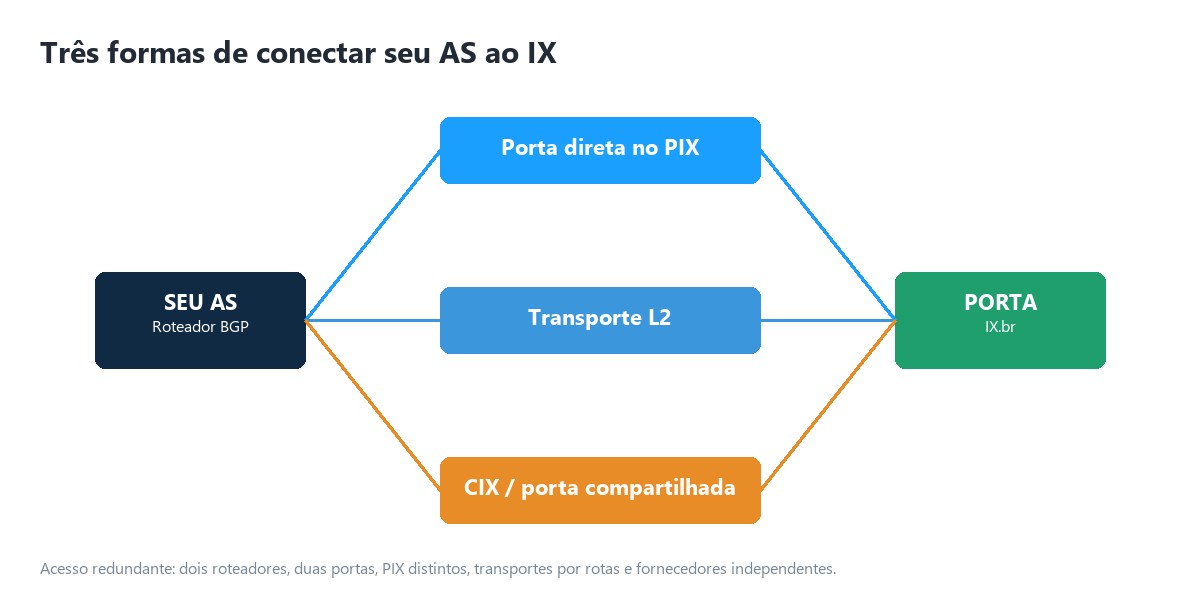
| Puerto directo en el PIX | Su infraestructura ya está en el lugar o los volúmenes justifican presencia. | Cross-connect, óptica, colocation y redundancia física. |
| Transporte L2 | Usted posee POP en otra dirección y quiere controlar su propio puerto. | MTU, VLAN, transparencia L2, latencia y SLA del transporte. |
| CIX | Entrada rápida, menor capacidad inicial u operación simplificada. | Compartición, políticas del proveedor, límites, visibilidad y migración futura. |
| Acceso redundante | El IX es crítico y hay volumen relevante. | Evitar falsa redundancia: rutas, ductos, equipos y energía comunes. |
Preguntas al proveedor
- ¿La entrega es puerto dedicado, VLAN en puerto compartido o transporte hasta otro PIX?
- ¿Cuál es la capacidad, MTU, SLA, latencia, plazo y política de upgrade?
- ¿Hay diversidad real de ruta, ducto, POP, switch y energía?
- ¿Quién proporciona óptica, cross-connect, LOA/CFA y soporte en incidentes?
- ¿Hay protección contra loop, tempestad, MAC excesivo y filtración de protocolos?
Proyecto de red y dimensionamiento
El puerto no debe dimensionarse solo por el promedio. Observe el pico, el percentil 95, el crecimiento, el horario de mayor movimiento, el tráfico por peer y el margen para fallas.
| Métrica | Uso en el proyecto |
|---|---|
| Pico de entrada/salida | Define el riesgo inmediato de saturación. |
| Percentil 95 | Caracteriza el uso sostenido sin reaccionar a microbursts. |
| Crecimiento mensual | Anticipa el upgrade y el plazo de contratación. |
| Top peers / prefijos | Muestra concentración y oportunidades de bilateral/PNI. |
| Latencia, jitter y pérdida | Valida la calidad, no solo el volumen. |
| Rutas recibidas y FIB | Confirma la capacidad del equipo. |
Regla operativa recomendada: defina disparadores internos de expansión antes de la saturación. Como referencia de ingeniería — no como regla del IX — muchas redes inician el proceso de upgrade cuando el uso sostenido alcanza aproximadamente entre 60% y 70%, ajustando al plazo de suministro y a la tolerancia de riesgo.
Redundancia correcta
- Dos routers o chasis independientes.
- Dos puertos y, cuando sea viable, PIX distintos dentro de la misma localidad.
- Transportes por rutas físicas y proveedores independientes.
- Energía y ópticas separadas.
- Sesiones con RS1 y RS2, además de bilaterales críticos.
- Política que preserve el servicio durante mantenimiento o falla parcial.
Paso a paso de adhesión
| Etapa | Qué hacer |
|---|---|
| 1. Defina el objetivo | Reducción de tránsito, latencia, resiliencia, presencia regional, IPv6 o acceso a contenidos específicos. |
| 2. Elija la localidad | Analice participantes, tráfico, distancia, rutas disponibles y estrategia regional. |
| 3. Elija el acceso | Seleccione PIX directo, transporte L2 o CIX; valide capacidad, SLA, MTU y diversidad. |
| 4. Prepare el AS | Actualice el registro, PeeringDB, IRR, ROAs, contactos, política y prefijos. |
| 5. Solicite la adhesión | Use Meu IX.br, vincule el ASN, seleccione activación/migración/ampliación y cumpla el flujo contractual. |
| 6. Concluya la capa física | Cross-connect, ópticas, VLAN/EVC, pruebas de luz y validación Ethernet. |
| 7. Reciba parámetros | Direcciones de la LAN, VLAN, Route Servers, límites y orientaciones de la localidad. |
| 8. Configure con seguridad | Interfaces, MTU, ACLs, max-prefix, filtros, RPKI, BGP y communities. |
| 9. Homologue | Pruebe ARP/ND, ping, BGP, rutas, tráfico, asimetría, pérdida y failover. |
| 10. Entre en producción | Active gradualmente, monitoree y compare KPIs con la línea base anterior. |
Configuración BGP de referencia
Modelo conceptual: direcciones, ASNs de los Route Servers, communities y límites deben sustituirse por los valores proporcionados por el IX.br y por la política vigente. No copie a producción sin validación.
La estructura lógica sigue: interfaz Ethernet → VLAN de peering (cuando aplique) → IPv4/IPv6 de la LAN → eBGP con RS1/RS2 → filtros de importación/exportación → política de preferencia → monitoreo.
Principios de política
- Exportación: anunciar solamente prefijos propios autorizados; adjuntar communities de ingeniería cuando sea necesario; denegar todo el resto.
- Importación: rechazar default, bogons y prefijos de la LAN del IX; rechazar RPKI inválido conforme a la política interna; imponer límites de tamaño de prefijo y de AS-PATH.
- Límites: definir max-prefix por sesión (con warning o teardown conforme a la política) y alertas antes del límite.
- Repetición: aplicar la misma configuración para RS1 y RS2, en IPv4 e IPv6.
| Origen de la ruta | Preferencia común | Observación |
|---|---|---|
| PNI crítico | Más alta | Cuando existe acuerdo y capacidad dedicada. |
| Peering en el IX | Alta | Evita tránsito, observando calidad y política. |
| Tránsito IP | Base | Mantiene alcance global y contingencia. |
Seguridad y buenas prácticas
Protección del enrutamiento
- Cree y mantenga ROAs RPKI; trate los anuncios inválidos de forma consciente.
- Mantenga route/route6 y AS-SETs en el IRR cuando se utilicen.
- Exporte solamente prefijos autorizados; nunca redistribuya la tabla completa por accidente.
- Defina max-prefix por sesión y alertas antes del límite.
- Use filtros de bogons, martians, longitudes de prefijo y AS-PATH anómalo.
- Aplique graceful shutdown en mantenimientos planificados.
- Use autenticación BGP cuando esté soportada y acordada.
Protección de la LAN de peering
- Permita solamente los protocolos y orígenes necesarios en la interfaz.
- No habilite IGP, DHCP, RA indebido, STP ni protocolos de descubrimiento en el puerto.
- Aplique CoPP/CPPr y límites de ARP/ND conforme a la plataforma.
- No anuncie la LAN del IX hacia Internet.
- Evite proxies ARP/ND y cualquier servicio innecesario en la interfaz.
- Monitoree MAC flapping, broadcast, errores ópticos y cambios inesperados.
DDoS y blackhole: el Remote Triggered Black Hole puede descartar tráfico destinado a un host atacado para proteger al resto de la red. Es una medida extrema — la validación, las communities y los prefijos aceptados deben seguir la documentación actual, y el equipo necesita probar el procedimiento antes de una crisis.
Operación, monitoreo y troubleshooting
| Síntoma | Verifique primero | Causa frecuente |
|---|---|---|
| BGP no sube | Luz, VLAN, IP, ASN, ACL, MTU y reachability. | VLAN incorrecta, filtro o parámetro divergente. |
| BGP sube sin rutas | Política de import, max-prefix, familia AFI/SAFI. | Filtro excesivo o sesión IPv4/IPv6 incompleta. |
| Las rutas no se aceptan | ROA, IRR, prefijo, origen y AS-PATH. | Objeto desactualizado o anuncio no autorizado. |
| El tráfico no pasa | ARP/ND, MAC, next-hop, ACL, MTU y retorno. | Problema L2 o asimetría/política del peer. |
| Pérdida en el pico | Utilización, drops, buffers, óptica y transporte. | Saturación o microburst. |
| Latencia alta | Camino, RTT por peer, transporte y geografía. | Participante remoto transportado hasta la localidad. |
KPIs esenciales
- Estado y uptime de las sesiones; número de rutas IPv4/IPv6.
- Tráfico por dirección, peer, aplicación y percentil.
- Errores, descartes, potencia óptica, flap de interfaz y MAC.
- Latencia, jitter, pérdida y traceroute hacia destinos representativos.
- RPKI/IRR, anuncios rechazados y cambios de política.
- Ahorro de tránsito y calidad percibida por el cliente.
NOC: mantenga runbooks, contactos de escalamiento, ventanas, matriz de responsabilidad y evidencias de pruebas. En el IX, un problema puede involucrar a su red, el transporte, el PIX, el fabric o el peer.
Costos, beneficios y business case
| Costos posibles | Beneficios medibles |
|---|---|
| Puerto o tarifa de la localidad, cuando aplique | Gbps retirados del tránsito IP pagado |
| Cross-connect, colocation, patch panel y ópticas | Reducción de latencia, jitter, pérdida y saltos |
| Transporte L2 o servicio CIX | Capacidad de absorber picos locales |
| Routers, licencias, puertos, energía y soporte | Mejor experiencia de video, juegos, cloud y aplicaciones |
| Implementación, monitoreo y operación | Resiliencia adicional y menor concentración de upstream |
| Redundancia física y upgrades futuros | Posibilidad de relaciones estratégicas con peers y CDNs |
Modelo simple de decisión: beneficio mensual estimado = ahorro de tránsito + valor de desempeño + valor de disponibilidad − costo total recurrente del IX. El payback es la inversión inicial dividida por el beneficio neto mensual. Además del cálculo, incluya los riesgos: plazo de upgrade, falla de transporte, concentración de peers, operación y crecimiento.
Decisión: un IX es atractivo cuando hay tráfico significativo con participantes presentes, camino físico eficiente y madurez BGP. El volumen bruto, por sí solo, no garantiza retorno.
Escenarios y topologías
Escenario A — proveedor regional
El ISP mantiene dos tránsitos IP y agrega el IX mediante un CIX de 10 Gb/s. Comienza en el ATM, mide los top peers y, al crecer, migra a puerto dedicado y transporte redundante. Dos routers eBGP en el borde, dos upstreams de tránsito y una política que prefiere el peering cuando la calidad y la capacidad son adecuadas.
Escenario B — empresa con ASN propio
Una institución con servicios digitales públicos participa para reducir la latencia hacia ISPs y clouds. Mantiene tránsito para alcance global, anuncia solamente servicios autorizados y refuerza DDoS, RPKI y observabilidad.
Escenario C — CDN o plataforma SaaS
La red acerca contenido a las eyeball networks en múltiples localidades. Usa ATM para cobertura, bilaterales para políticas específicas y PNI cuando el volumen bilateral lo justifica. La planificación considera capacidad de caché, backhaul y retorno.
Escenario D — arquitectura de alta disponibilidad
Dos routers, dos puertos, dos PIX y transportes por rutas independientes. Sesiones RS1/RS2 y bilaterales críticos. Pruebas programadas demuestran que la redundancia existe de hecho.
Checklist de preparación
- Objetivo e indicadores de éxito definidos.
- ASN, prefijos y contactos oficiales actualizados.
- ROAs, IRR/AS-SET y PeeringDB revisados.
- Localidad elegida tras el análisis de participantes y tráfico.
- PIX, transporte o CIX contratado y con SLA conocido.
- Router, interfaces, ópticas, MTU y capacidad validados.
- Políticas IPv4 e IPv6 aprobadas.
- Filtros, max-prefix, CoPP y communities revisados.
- Sesiones RS1/RS2 y bilaterales planificadas.
- Monitoreo, NOC, runbook y escalamiento listos.
- Prueba de falla, rollback y criterios de aceptación documentados.
- Disparadores de upgrade y revisión trimestral definidos.
Preguntas finales para el decisor
- ¿Qué destinos representan la mayor parte de nuestro tráfico?
- ¿Esas redes están presentes en la localidad elegida y aceptan peering?
- ¿Cuánto cuesta llevar capacidad redundante hasta el PIX?
- ¿Qué parte del tránsito podrá realmente migrar?
- ¿La ganancia de calidad es medible para los clientes?
- ¿El equipo puede operar BGP, seguridad e incidentes 24x7?
Glosario esencial
| Sigla | Definición |
|---|---|
| AS / ASN | Sistema Autónomo / número identificador en BGP. |
| BGP | Protocolo de enrutamiento entre Sistemas Autónomos. |
| CDN | Red de distribución de contenido. |
| CIX | Proveedor de puerto compartido del IX.br. |
| EVC | Circuito virtual Ethernet usado en transporte L2. |
| FIB | Tabla de reenvío instalada en el hardware. |
| IRR | Registro de política y objetos de enrutamiento. |
| IX / IXP | Punto de intercambio de tráfico entre redes. |
| LAN de peering | Segmento Ethernet sobre el cual los participantes forman BGP. |
| PNI | Interconexión privada entre dos redes. |
| PIX | Punto físico de acceso al IX.br. |
| RPKI / ROA | Validación criptográfica de la autorización de origen de prefijos. |
| Route Server | Servidor que redistribuye rutas BGP sin transportar los paquetes. |
| Tránsito IP | Servicio de alcance a Internet global. |
Referencias oficiales y lectura complementaria
Fuentes consultadas en septiembre de 2026. Como localidades, PIX, valores, requisitos y políticas cambian, confirme siempre la versión vigente antes de contratar o configurar.
- IX.br — portal, localidades, participantes, topologías y estadísticas: ix.br
- Documentación IX.br: docs.ix.br
- Adhesión por localidad y relación dinámica de PIX/CIX: docs.ix.br/adesao
- Meu IX.br — solicitudes y gestión de la participación: meu.ix.br
- Política de Requisitos Técnicos del IX.br — documento oficial
- Política de communities BGP y Route Servers v4.4 (21/07/2026) — documento oficial
- Registro.br — Recursos de Numeración y Sistema Autónomo: registro.br/tecnologia/numeracao
- PeeringDB — datos públicos de presencia y política de peering: peeringdb.com
- RFC 4271 — Border Gateway Protocol 4: rfc-editor.org/rfc/rfc4271
- RFC 7947 / 7948 — operación y uso de Route Servers en IXPs
Nota editorial
Este material es educativo y no sustituye la documentación contractual, la política técnica vigente, el proyecto ejecutivo ni la validación del IX.br, PIX, CIX y los proveedores involucrados. Conectar redes directamente es reducir distancia técnica, económica y operativa.
EnQ Digital: Cloud • Data Center • Baremetal • Storage • Conectividad • Soporte