
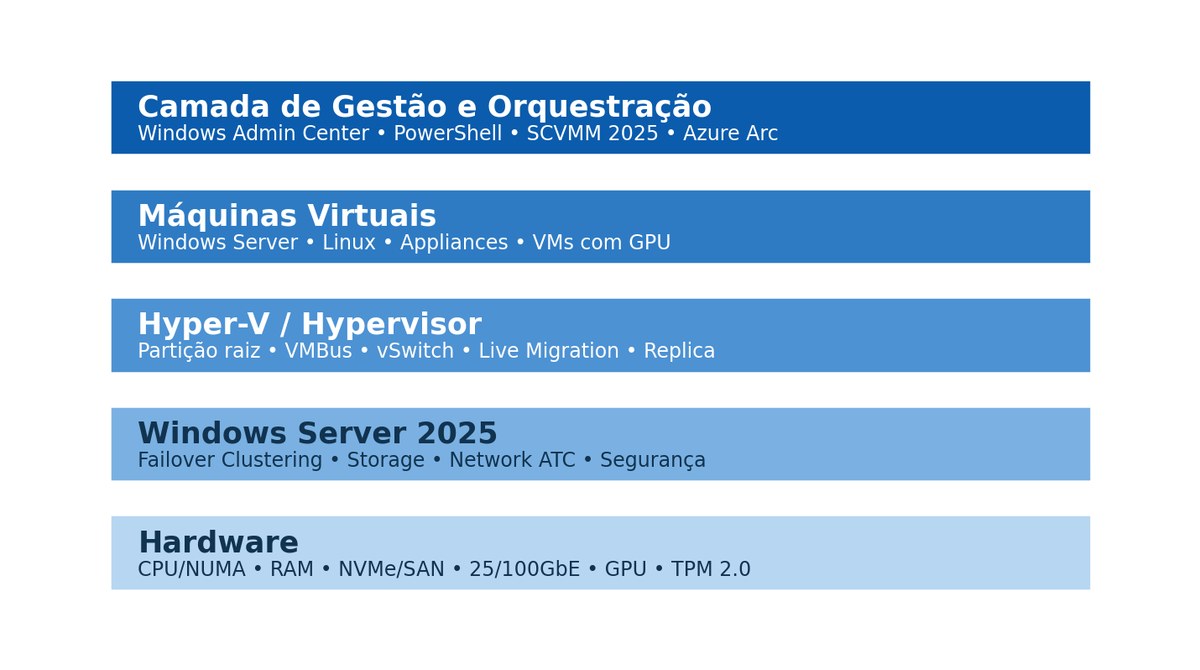
This technical material brings together, in a single view, the Hyper-V architecture on Windows Server 2025: hypervisor and root partition, VMs and NUMA, storage and virtual networking, high availability, hybrid management with Windows Admin Center, System Center VMM and Azure Arc, plus Windows Server and System Center licensing.
The goal is to serve three audiences at once — architecture and engineering, infrastructure operations, and technical-financial decision-making — with numerical capacity examples treated as engineering models, not lab benchmarks.
About this material: content consolidated from Microsoft's public documentation (Microsoft Learn and licensing pages), with references consulted on September 2, 2026. Licensing rules vary by commercial program, Software Assurance, CSP, Enterprise Agreement, and region — final validation should be done with the reseller or licensing specialist responsible for the contract.
What Hyper-V is and where it fits
Hyper-V is Microsoft's type 1 hypervisor integrated into Windows Server. When the role is enabled, Windows Server begins operating on top of the hypervisor: the management operating system runs in the root partition, while VMs run in isolated child partitions. This differentiates it from hosted (type 2) hypervisors, in which the traditional operating system remains directly on the hardware.
Ecosystem components
| Component | Role in the environment |
|---|---|
| Hyper-V | Virtualization of CPU, memory, storage, network, and devices. |
| Failover Clustering | High availability for hosts and VMs, with failover and Live Migration. |
| Windows Admin Center | Web dashboard for managing hosts, clusters, VMs, storage, network, and hybrid services. |
| System Center VMM 2025 | Fabric management, templates, private clouds, logical network and storage, placement, and automation. |
| Azure Arc | Extension of the Azure control plane for on-premises and multicloud servers and VMs. |
| Microsoft Entra ID | Identity and RBAC in the hybrid management plane; does not replace AD DS in every cluster scenario. |
Product status
There is no free "Hyper-V Server 2022/2025" equivalent to the old standalone product. Hyper-V Server 2019 was the last standalone version, and its extended support ends on January 9, 2029. For new projects, the reference point is Hyper-V as a Windows Server 2025 role or Azure Local.
Where it makes the most sense
- Microsoft-centric private cloud with Windows Server and Active Directory.
- Environments seeking to reduce VMware dependency while retaining enterprise-grade cluster capabilities.
- Branch offices and edge sites with few hosts, using Windows Admin Center and Azure Arc.
- Highly virtualized data centers, where Windows Server Datacenter and SCVMM deliver virtualization rights and centralized management.
- Linux workloads and appliances, provided they are validated against the vendor's support matrix.
- GPU workloads on Windows Server 2025, including DDA and GPU Partitioning in supported scenarios.
Starting point: choosing Hyper-V as a platform should be done with architecture and licensing considered together — the Datacenter edition significantly changes the economics in heavily virtualized Windows environments.
Hypervisor architecture
The hypervisor implements isolation and scheduling among partitions. The root partition holds the management stack and physical drivers. Modern VMs use synthetic devices and VMBus, avoiding the penalty of emulated devices. Integration services and updated drivers reduce CPU overhead and improve I/O.
Generation 1 versus Generation 2
| Feature | Generation 1 | Generation 2 |
|---|---|---|
| Firmware | Legacy BIOS | UEFI |
| Boot | IDE / legacy | SCSI / UEFI |
| Secure Boot | No | Yes |
| vTPM | Limited / indirect | Supported depending on OS and configuration |
| vCPU scale on WS2025 | Up to 64 | Up to 2,048 |
| Recommendation | Legacy and compatibility | Standard for new workloads |
Recommended standard: for new projects, use VM Generation 2, UEFI, Secure Boot when supported, and VHDX disks on virtual SCSI controllers. VMM 2025 also now creates Generation 2 VMs by default.
Installation and hardware requirements
The host should be treated as an infrastructure appliance: aligned firmware, hardware-assisted virtualization enabled, DEP/NX, certified drivers, coherent NUMA configuration, and BIOS set to an appropriate performance profile. In clusters, homogeneity across nodes simplifies Live Migration, maintenance, and troubleshooting.
| Layer | Practical recommendation |
|---|---|
| CPU | Intel VT-x/VT-d or AMD-V/IOMMU; SLAT; keep families and microcode compatible across nodes. |
| Memory | ECC; size host reserve; avoid sustained memory pressure. |
| Host boot | Mirroring/RAID1 or resilient device; separate OS from VM storage. |
| Network | Minimum 10/25 GbE in production; 25/100 GbE for HCI, heavy migration, or NVMe. |
| Storage | NVMe/SAS/SAN/SMB3 depending on architecture; validate latency, queueing, and resilience. |
| Security | TPM 2.0, Secure Boot, signed firmware, and patch policy. |
| Management | Prefer Server Core where operations allow; remote administration via WAC and PowerShell. |
Validation before clustering
- Run Test-Cluster and fix relevant warnings before going to production.
- Standardize firmware, NIC/HBA drivers, BIOS, and patch level.
- Validate DNS, NTP, and AD DS or the workgroup cluster model as appropriate for the architecture.
- Define separate or logically isolated networks for Management, VM, Storage, and Live Migration.
- Test failover, Live Migration, backup, and restore before releasing workloads.
VMs, CPU, memory, and NUMA
Hyper-V does not enforce a fixed ratio between vCPU and logical processors. This does not mean oversubscription is free: the correct ratio depends on tolerable latency, burst behavior, observed equivalent CPU ready time, VM size, NUMA topology, and workload profile.
| Item | Windows Server 2025 — Hyper-V maximum |
|---|---|
| vCPU per Generation 2 VM | 2,048 |
| Memory per Generation 2 VM | 240 TB |
| Running VMs per host | 1,024 |
| Logical processors per host | 2,048 |
| Host memory | Up to 4 PB with 5-level paging; 256 TB with 4-level paging |
| Nodes per Failover Cluster | 64 |
| Running VMs per cluster | 8,000 |
| VHDX | Up to 64 TB per virtual disk |
Maximum is not sizing: scale limits are platform ceilings, not density recommendations. The project needs to account for SLA, N-node failure, maintenance windows, and growth margin.
Best practices for CPU and memory
- Start conservatively for critical workloads; increase vCPU only with evidence of saturation.
- Avoid oversized VMs when several smaller VMs meet the SLA and improve mobility and failover.
- Align large VMs to the host's NUMA topology when the workload is latency-sensitive.
- Keep operational headroom for failover: a full cluster loses resiliency.
- For databases and applications that cache aggressively, validate the dynamic memory policy with the vendor; in many cases, static memory simplifies predictability and troubleshooting.
Storage, VHDX, CSV, and Storage Spaces Direct
The I/O path spans four layers: the guest's storage stack, the virtualization layer, the host's storage stack, and physical media. Bottlenecks can arise at any of these layers; therefore diagnostics should correlate latency inside the VM, host queues, CSV/SMB counters, HBA/NIC, and the backend storage.
| Technology | Typical use | Points of attention |
|---|---|---|
| VHDX | Standard virtual disk | Up to 64 TB; protection against corruption during power failures; supports 4K logical sector. |
| Fixed VHDX | High predictability | Allocates all space upfront; slower provisioning. |
| Dynamic VHDX | Flexibility and capacity | May require monitoring for growth and fragmentation. |
| CSV | Cluster shared storage | Consistent namespace at C:\ClusterStorage; foundation for mobility and failover. |
| SMB 3.x | VM storage over file servers / SOFS | SMB Multichannel, SMB Direct/RDMA, and encryption depending on the design. |
| Storage Spaces Direct | HCI with local disks | Requires rigorous network, media, resiliency, and capacity design. |
| SAN FC/iSCSI | External storage | Multipath, zoning, queue depth, ALUA/MPIO, and end-to-end latency. |
Checkpoints are not backup: use Production Checkpoints as the default for production when compatible, but keeping them for long periods increases the differencing disk chain, consumption, and operational risk. The platform maximum is 50 checkpoints per VM; good practice is to keep few and for a short duration.
Virtual networking, SET, RDMA, SR-IOV, and SDN
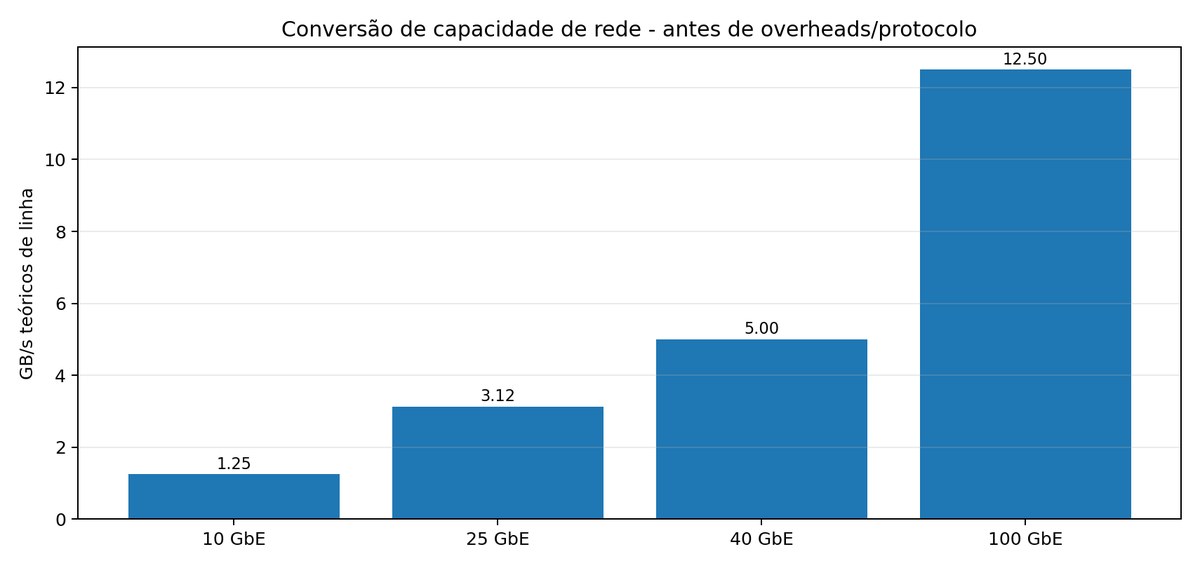
Hyper-V networking combines the extensible vSwitch, VLANs, QoS, offloads, SET (Switch Embedded Teaming), SR-IOV, vRSS, and, in appropriate architectures, RDMA/SMB Direct. In Windows Server 2025, Network ATC allows describing network intents and automating consistent configuration across clusters.
| Function | Recommended technology | Example |
|---|---|---|
| Management | Dedicated VLAN; physical redundancy | 2 x 25 GbE in SET |
| VM traffic | vSwitch + VLAN/VRF/SDN | QoS per tenant or service |
| Live Migration | Dedicated network or converged with QoS | 25/100 GbE; multiple streams |
| SMB/S2D storage | RDMA when supported | RoCEv2/iWARP + DCB depending on the design |
| Direct NIC access | SR-IOV | Low latency, less operational flexibility |
| Host networking automation | Network ATC | Management / Compute / Storage intents |
Live Migration example: a VM with 64 GB of RAM on a dedicated 25 Gb/s link has a theoretical floor of about 20.5 seconds to transfer 64 GB at line rate. With a useful efficiency of 70%, the mathematical time rises to about 29 seconds. In practice, memory pages continue to change during migration, there is compression/SMB, protocol overhead, and contention — the actual time may be longer.
High availability, Live Migration, and Hyper-V Replica
| Feature | Objective | Note |
|---|---|---|
| Failover Cluster | Restart or move VMs after node failure | Design for N+1 capacity or greater. |
| Live Migration | Move a running VM between hosts | Can use TCP/IP, compression, or SMB; depends on architecture. |
| Storage Live Migration | Move storage while the VM remains active | Useful for maintenance and rebalancing. |
| Hyper-V Replica | Asynchronous replication between hosts and sites | Frequencies of 30 s, 5 min, or 15 min. |
| Azure Site Recovery | DR orchestrated via Azure | Integration available in Windows Admin Center workflows. |
RPO is not RTO: Hyper-V Replica sets the replication frequency and helps with RPO, but RTO depends on boot, dependencies, DNS, network, runbook, application validation, and DR site capacity.
Quorum and resiliency
- Use Cloud Witness, File Share Witness, or Disk Witness depending on design and connectivity.
- Design the cluster to withstand planned maintenance and at least the failure defined in the SLA.
- Apply Cluster-Aware Updating or an equivalent process with drain, migration, and validation.
- Test host loss, storage path loss, NIC failure, and witness unavailability.
Management dashboards and operating model
| Tool | When to use | Scale / characteristic |
|---|---|---|
| Hyper-V Manager | Isolated host, quick troubleshooting | Simple; focused on host and VM. |
| Failover Cluster Manager | Cluster and role operation | HA, CSV, migration, and events. |
| Windows Admin Center | Modern web dashboard | Hosts, clusters, HCI, VM, performance, Arc, and Azure services. |
| PowerShell | Automation and operation at scale | Scriptable, idempotent via patterns and DSC. |
| SCVMM 2025 | Enterprise fabric and private cloud | Hosts, clusters, templates, logical network and storage, clouds, and placement. |
| Azure Portal + Arc | Hybrid governance and self-service | RBAC, Policy, Defender, Monitor, Update Manager, and Azure APIs. |
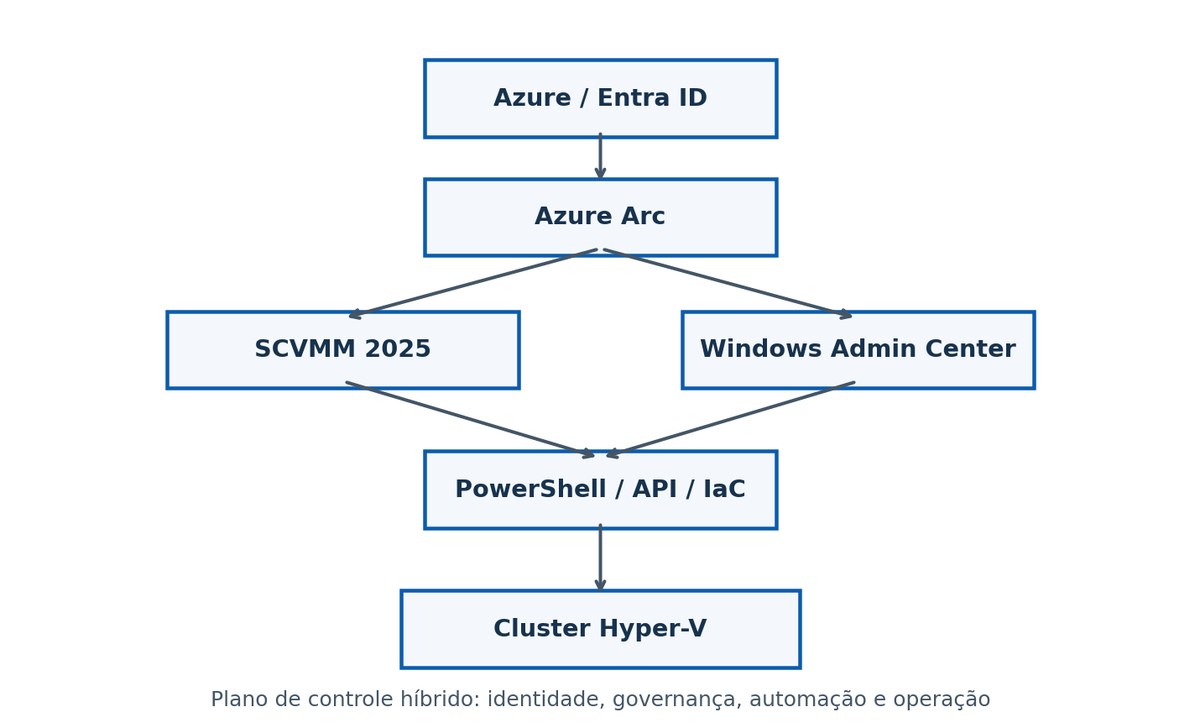
Windows Admin Center is a good operational layer for teams that don't need SCVMM's full fabric management: inventory, VM creation and configuration, Live Migration, events, and CPU, memory, IOPS, and throughput metrics. SCVMM 2025 treats the data center as a fabric — compute, storage, and networking — supports Windows Server 2025 and Azure Local, reinforces TLS 1.3, and uses Generation 2 as the default for new VMs. For Azure integration, the modern direction is Arc-enabled SCVMM.
Microsoft Entra ID, Azure Arc, and hybrid integration
Microsoft Azure Active Directory was renamed Microsoft Entra ID. In Hyper-V, it's important to separate the identity of the management plane from the identity and domain services used by the cluster and workloads. Entra ID provides authentication and RBAC for modern services; AD DS remains relevant for Kerberos, computer accounts, GPOs, and various infrastructure scenarios.
| Integration | What it delivers | What it does not mean |
|---|---|---|
| WAC + Entra ID | Gateway authentication and access control for the dashboard | Does not "join the host to Entra ID" as a universal replacement for AD DS. |
| Azure Arc-enabled Servers | Inventory, Policy, Update Manager, Defender/Monitor, and hybrid services | Does not by itself manage the entire virtualization fabric. |
| Arc-enabled SCVMM | Represents VMM and VMs in Azure and enables lifecycle and self-service | Requires SCVMM and Arc Resource Bridge. |
| AD DS | Domain, Kerberos, GPO, and traditional server identity | Does not by itself deliver cloud-native governance in Azure. |
Recommended flow
- Register Windows Admin Center with Azure and enable Entra ID authentication for the gateway, when applicable.
- Onboard hosts and servers to Azure Arc according to corporate policy.
- In SCVMM environments, deploy Arc Resource Bridge and enable VMM resources and VMs in Azure.
- Apply RBAC by Entra ID groups, separating operations, security, backup, and fabric administration.
- Use Azure Policy, Defender, Monitor, and Update Manager according to security and compliance requirements.
Orchestration, automation, and Infrastructure as Code
Hyper-V can be operated in a fully automated way. The automation design should separate host provisioning, cluster configuration, VM templates, network, storage, lifecycle, patching, backup, observability, and decommissioning.
| Layer | Tools | Examples |
|---|---|---|
| Host / Cluster | PowerShell, DSC, Ansible in supported scenarios | vSwitch, cluster, CSV, Live Migration. |
| VM lifecycle | Hyper-V PowerShell, VMM cmdlets | New-VM, Set-VM, templates, placement. |
| Hybrid self-service | Arc-enabled SCVMM | Azure Portal, RBAC, ARM/Bicep/Terraform/AzAPI. |
| Runbooks | System Center Orchestrator or external automation | Start/stop, maintenance, incident workflow. |
| Pipelines | Git + CI/CD | Infra as Code, review, dev-hml-prod promotion. |
Idempotency and governance
- Keep parameters — CPU, RAM, VLAN, storage tier, backup policy — in a catalog or template, not in ad hoc scripts.
- Version changes in Git and apply peer review for production.
- Use RBAC and Just Enough Administration when possible.
- Record who requested, approved, executed, and validated each change.
- Define the full lifecycle: creation, operation, resizing, backup, patching, and decommissioning.
Security and hardening
| Control | Application in Hyper-V |
|---|---|
| Secure Boot / UEFI | Generation 2 VM and host with secure boot when supported. |
| vTPM | Key protection and BitLocker on compatible VMs. |
| Shielded VMs / HGS | Protected fabric and attestation for high-trust scenarios. |
| Credential Guard / Defender | Host hardening per Microsoft baseline. |
| Host firewall | Allow only necessary management and cluster ports and sources. |
| Admin tiering | Separate fabric, domain, backup, and application accounts. |
| Patching | Orchestrate updates with migration/drain and rollback. |
| Logging | Forwarding/SIEM for Hyper-V, cluster, PowerShell, and authentication events. |
The virtualization host is Tier 0: compromising the host can expose multiple VMs. Treat hosts, SCVMM, WAC, the related AD DS, backup, and fabric credentials as high-impact assets. Host Guardian Service is the core of the guarded fabric — it validates trusted hosts and manages the keys to start shielded VMs — recommended when the infrastructure operator should not have unrestricted access to tenant VM content.
Hyper-V and Windows Server licensing
Hyper-V is not licensed as a separate product when used as a Windows Server role. Cost and rights depend on the Windows Server edition and license on the host and on the Windows Server VMs running on it.
| Topic | Windows Server 2025 Standard | Windows Server 2025 Datacenter |
|---|---|---|
| Profile | Physical or lightly virtualized | Data center and high virtualization |
| Model | Per core | Per core |
| Physical minimum | 8 cores per CPU and 16 cores per server | 8 cores per CPU and 16 cores per server |
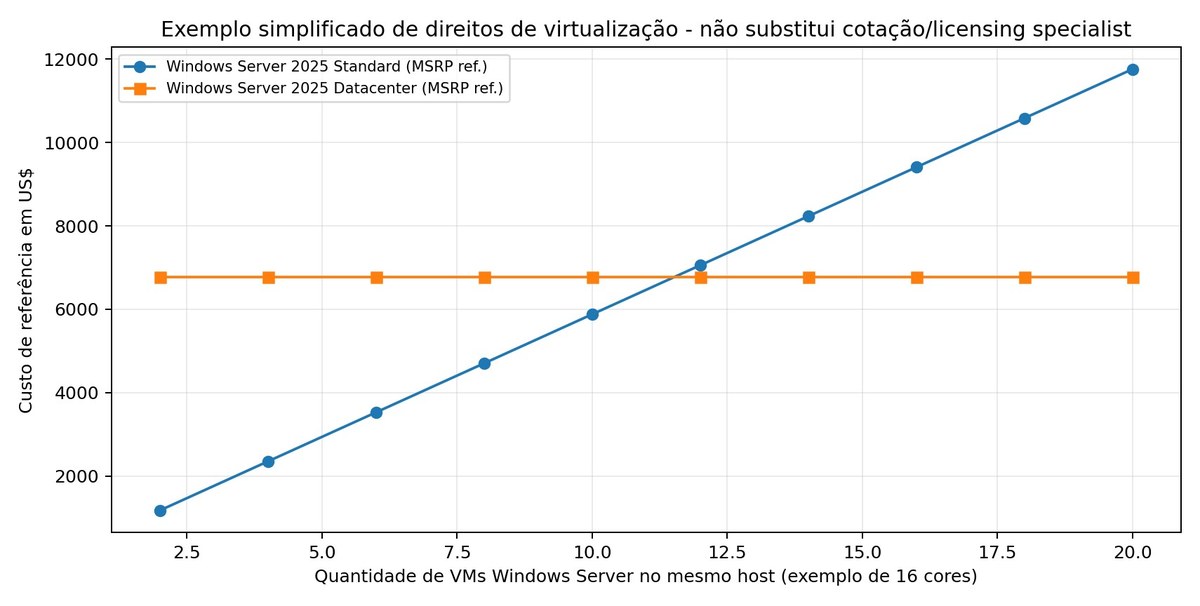
| Virtualization right (all cores licensed) | 2 Windows Server OSEs/VMs | Unlimited Windows Server VMs on the licensed host |
| CAL | Windows Server CAL typically required | Windows Server CAL typically required |
| Microsoft reference MSRP | US$ 1,176 | US$ 6,771 |
How to calculate Standard
A host with 2 processors of 8 cores each has 16 physical cores. Licensing the 16 cores with Standard grants the right to 2 Windows Server OSEs. To run 4 OSEs on the same host, the full core set is licensed again; for 6 OSEs, three sets, and so on. Using public reference pricing, six Standard sets for 12 VMs would total US$ 7,056 — above the Datacenter MSRP of US$ 6,771. Discounts, core packs, Software Assurance, CSP, CALs, and contract terms can completely change the decision. Linux does not consume a Windows Server OSE right, but the Hyper-V host still needs to be properly licensed.
Other models
| Model | Summary |
|---|---|
| Per-VM licensing | Available via subscription or with active Software Assurance; each VM licensed by vCores, with a minimum of 8 core licenses per VM. Relevant on large hosts with few Windows Server VMs. |
| Pay-as-you-go via Azure Arc | Standard and Datacenter billed through the Azure subscription, can be turned on and off, same rate for both editions, with no CAL requirement for base functionality. It is per device/VM — the host license does not automatically grant rights to VMs. |
| Hyper-V Server 2019 | Still appears in legacy environments, but extended support ends January 9, 2029. Should not be the basis for new long-term projects. |
Note: MSRP values are for planning and estimation purposes; final validation should be done with the reseller or licensing specialist responsible for the contract.
Licensing and the role of System Center VMM
SCVMM is part of System Center 2025; its server components are not sold individually as a separate "VMM only" product. System Center management licensing is based on managed endpoints and servers and on physical cores, with Standard and Datacenter editions differentiated by the rights to manage OSEs.
| System Center 2025 | Standard | Datacenter |
|---|---|---|
| Right per fully licensed server | Manage up to 2 OSEs | Manage unlimited OSEs |
| Minimum | 8 cores per CPU / 16 per server | 8 cores per CPU / 16 per server |
| Includes VMM | Yes | Yes |
| Includes Operations Manager, DPM, Orchestrator, etc. | Yes | Yes |
| Microsoft reference MSRP | US$ 1,455 | US$ 3,968 |
When VMM adds value
- Dozens or hundreds of hosts and VMs requiring templates and placement.
- Private cloud with quotas, logical clouds, and network/storage standardization.
- Integrated operation of Hyper-V and some VMware environments during transition.
- Need for Arc-enabled SCVMM, Azure self-service, and automation via ARM/Bicep/Terraform/API.
- Integration with Operations Manager, DPM, and Orchestrator within a System Center strategy.
Performance, sizing, and numerical examples
Performance engineering should start from the SLA and workload profile, not from the hypervisor's maximum. CPU, memory, storage, and network need to be modeled separately; final density is determined by whichever resource saturates first and by the headroom needed for failures and maintenance.
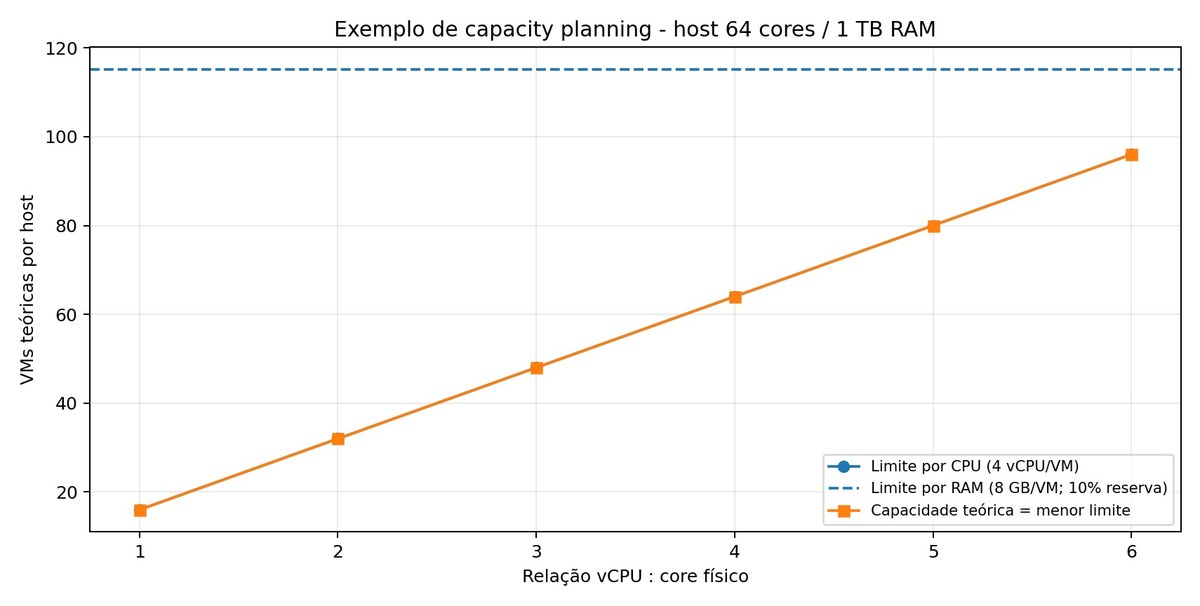
64-core / 1 TB host example
| Assumption | Value |
|---|---|
| Physical cores | 64 |
| Installed RAM | 1,024 GB |
| RAM reserve for host and overhead | 10% |
| Usable engineering RAM | ~922 GB |
| Standard VM | 4 vCPU / 8 GB |
| CPU oversubscription 2:1 | 32 VMs by CPU limit; RAM would allow ~115 |
| CPU oversubscription 4:1 | 64 VMs by CPU limit; RAM would allow ~115 |
| CPU oversubscription 6:1 | 96 VMs by CPU limit; RAM would allow ~115 |
In this example, at 4:1 the CPU limit would be 64 VMs, with memory headroom; at 6:1, the model would allow 96 VMs before hitting the RAM ceiling. This does not mean 6:1 is recommended: light VDI, application servers, databases, and low-latency workloads behave completely differently.
Indicators that should be measured
| Domain | Metrics |
|---|---|
| CPU | Utilization, frequency, % guest/runtime, queueing, application latency, NUMA. |
| Memory | Available MB, pressure, paging, working set, dynamic memory events. |
| Storage | IOPS, MB/s, read/write latency, queue length, CSV/SMB counters. |
| Network | Gb/s, drops, retransmissions, RDMA counters, vSwitch/VMQ/vRSS. |
| VM | Boot time, response time, transaction rate, application-specific KPI. |
| Cluster | Failover time, Live Migration time, CSV redirected I/O, node health. |
Correct benchmarking: use DiskSpd for storage, tools such as ntttcp for network when appropriate, and, above all, the application's own benchmark. The goal is to measure the delivered service, not to win a synthetic number.
GPU, AI, and accelerated workloads
Windows Server 2025 expands GPU scenarios in Hyper-V. It's possible to use Discrete Device Assignment (DDA), dedicating a PCIe device to the VM, or GPU Partitioning (GPU-P), splitting a physical GPU into hardware-isolated partitions via SR-IOV on compatible equipment.
| Mode | Advantage | Limitations / use |
|---|---|---|
| DDA | Dedicated, predictable access | GPU is assigned to the VM; validate mobility, cluster support, and OEM support. |
| GPU-P | Shares the GPU across multiple VMs | Requires homogeneous configuration across the cluster and supported GPUs. |
| GPU-P + Live Migration | Mobility with acceleration on WS2025 | Migration may use TCP/IP with compression and consume more CPU and time. |
Use in AI: model inference and CUDA/DirectML workloads according to driver and vendor support, plus VDI, rendering, and engineering with dedicated or partitioned GPU. For high-performance distributed training, GPU-to-GPU interconnect and the specific ecosystem must also be evaluated — Hyper-V may not be the only architectural decision.
Backup, DR, and continuity
The strategy should combine consistent VM and application backup, immutable or offline copies, restore testing, and DR. Hyper-V Replica can be part of the replication layer, but it does not replace backup with retention and protection against deletion and ransomware.
| Layer | Objective | Examples |
|---|---|---|
| Local backup | Fast restore | Veeam, DPM, VSS/RCT-certified solutions. |
| Secondary copy | Protection against site failure | Another data center or object storage. |
| Immutability | Ransomware | Object Lock/WORM/air-gap depending on the solution. |
| Replica | Short RPO between sites | Hyper-V Replica 30 s / 5 min / 15 min. |
| DR orchestration | Coordinated failover | Azure Site Recovery or tested runbooks. |
Minimum test matrix
- File restore and full VM restore.
- Application-aware restore of database and directory.
- Failover of a critical VM and failback.
- Complete host loss and storage path loss.
- Site DR: network, DNS, identity, firewall, certificates, and dependencies.
- Restore in an isolated environment to validate integrity and security.
VMware migration and coexistence
System Center VMM 2025 supports managing compatible VMware hosts in defined scenarios and brought performance improvements to ESXi-to-Hyper-V conversion. Migration should be treated as a modernization program, not just a disk conversion.
| Step | Deliverable |
|---|---|
| Discovery | Inventory of VMs, OS, CPU/RAM, storage, VLAN, dependencies, and licenses. |
| Classification | Rehost, replatform, retire, retain, refactor. |
| Hyper-V landing zone | Clusters, network, storage, templates, backup, and observability. |
| Pilot conversion | Non-critical VMs and performance/driver testing. |
| Waves | Batches by application and dependency, with rollback. |
| Optimization | Right-sizing, Generation 2, Secure Boot, new tiers, and automation. |
Points that break migrations
- Appliances with official support restricted to VMware.
- Dependency on snapshots/checkpoints or specific drivers.
- Software licensing tied to hardware, UUID, or hypervisor.
- Networking with dvSwitch/NSX and policies not mapped to VLAN/SDN on Hyper-V.
- Backup, monitoring, and automation still dependent on vCenter APIs.
- Very large VMs without adequate window, bandwidth, or target storage.
Technical comparison and adoption criteria
| Criterion | Hyper-V / WS2025 | VMware vSphere | Proxmox VE |
|---|---|---|---|
| Windows/AD integration | Very strong | Strong | Good, more manual / third-party |
| Enterprise management | SCVMM / WAC / Arc | vCenter / Aria / ecosystem | GUI + API + ecosystem |
| Licensing | Windows Server per core; VMM/System Center optional | Current Broadcom model must be quoted | Open source + support subscription |
| HCI | S2D / Azure Local | vSAN | Integrated Ceph |
| Hybrid Azure | Arc / ASR / Entra / WAC | Integrations available | Guest Arc possible; not native fabric |
| GPU | WS2025 DDA / GPU-P | vGPU / passthrough depending on the stack | PCIe passthrough / vGPU depending on the stack |
There is no universal winner: the choice should weigh workload support, team skills, backup and DR ecosystem, automation, licensing, certified hardware, and transition cost. For Microsoft-heavy environments, Hyper-V gains strength through integration and Windows Server Datacenter rights.
Deployment roadmap and production checklist
| Phase | Scope |
|---|---|
| 0 — Assessment | Inventory, SLA, dependencies, licenses, security, and capacity. |
| 1 — Design | Compute, storage, network, identity, management, backup, DR, and observability. |
| 2 — Build | Firmware, Windows Server 2025, Hyper-V, cluster, network, and storage. |
| 3 — Management | WAC, SCVMM, Arc, RBAC, ITSM, and automation. |
| 4 — Validation | Benchmark, failover, restore, patching, DR, and security testing. |
| 5 — Pilot | Controlled workloads and performance baseline. |
| 6 — Migration waves | Batches with runbook and rollback. |
| 7 — Operations | SLO, capacity, patching, lifecycle, cost, and continuous improvement. |
Technical acceptance criteria
| Domain | Minimum acceptance criterion |
|---|---|
| HA | Host failover tested without loss of VM integrity. |
| Live Migration | Migration within the expected window and SLO under representative load. |
| Storage | Latency and throughput meet the workload baseline. |
| Network | No abnormal drops or retransmissions; redundancy validated. |
| Backup | VM and application restore proven. |
| DR | RPO and RTO tested with dependencies. |
| Security | Baseline, RBAC, MFA on the management plane, and centralized logs. |
| Operations | Runbooks, alerts, dashboards, capacity, and escalation defined. |
The greatest operational gain comes when Hyper-V stops being treated as just "a hypervisor" and is deployed as a platform: templates, RBAC, automation, observability, tested backup and DR, capacity management, and change governance.
Quick glossary
| Term | Definition |
|---|---|
| AD DS | Active Directory Domain Services; domain, Kerberos, LDAP, and GPO. |
| Entra ID | Microsoft's cloud identity service, formerly Azure AD. |
| Arc | Azure's hybrid and multicloud control plane for resources outside Azure. |
| CSV | Cluster Shared Volumes. |
| DDA | Discrete Device Assignment — PCIe passthrough to a VM. |
| GPU-P | GPU Partitioning — partitioning a GPU among VMs. |
| HGS | Host Guardian Service for guarded fabric and Shielded VMs. |
| OSE | Operating System Environment; a concept used in licensing. |
| S2D | Storage Spaces Direct. |
| SCVMM / VMM | System Center Virtual Machine Manager. |
| SET | Switch Embedded Teaming. |
| VHDX | Hyper-V's modern virtual disk format. |
| VMBus | Optimized communication channel between Hyper-V partitions. |
Sources used and notes
This material was prepared based on Microsoft's public documentation consulted on September 2, 2026. Scale limits, reference prices, lifecycle dates, and features may change — always confirm with the official source before designing a real environment.
Main references
- Hyper-V maximum scale limits in Windows Server: learn.microsoft.com/windows-server/virtualization/hyper-v/maximum-scale-limits
- Windows Server 2025 pricing and licensing: microsoft.com/windows-server/pricing
- Windows Server licensing documents: microsoft.com/licensing/docs/view/Windows-Server
- Windows Server pay-as-you-go with Azure Arc: learn.microsoft.com/windows-server/get-started/windows-server-pay-as-you-go
- Manage Hyper-V VMs with Windows Admin Center: learn.microsoft.com/windows-server/manage/windows-admin-center/use/manage-virtual-machines
- Windows Admin Center Azure integration: learn.microsoft.com/windows-server/manage/windows-admin-center/azure/azure-integration
- System Center VMM 2025 overview: learn.microsoft.com/system-center/vmm/overview
- What's new in VMM 2025: learn.microsoft.com/system-center/vmm/whats-new-in-vmm
- System Center 2025 pricing and licensing: microsoft.com/system-center/system-center-2025
- Azure Arc-enabled System Center VMM: learn.microsoft.com/azure/azure-arc/system-center-virtual-machine-manager
- Hyper-V Replica: learn.microsoft.com/windows-server/virtualization/hyper-v/replication-virtual-machines
- Hyper-V processor performance: learn.microsoft.com/windows-server/administration/performance-tuning/role/hyper-v-server/processor-performance
- Hyper-V storage I/O performance: learn.microsoft.com/windows-server/administration/performance-tuning/role/hyper-v-server/storage-io-performance
- GPU partitioning in Hyper-V: learn.microsoft.com/windows-server/virtualization/hyper-v/gpu-partitioning
- Hyper-V Server 2019 lifecycle: learn.microsoft.com/lifecycle/products/hyperv-server-2019
- What's new in Windows Server 2025: learn.microsoft.com/windows-server/get-started/whats-new-windows-server-2025
- Host Guardian Service: learn.microsoft.com/windows-server/security/guarded-fabric-shielded-vm/guarded-fabric-manage-hgs
Editorial note
The numerical capacity examples, comparisons, and best-practice recommendations have been organized for educational purposes. They do not constitute a quote, a lab benchmark, or licensing advice — final sizing and economics depend on the actual hardware, the SLA, and each project's commercial contract.
EnQ Digital: Cloud • Data Center • Baremetal • Storage • Support • Security