
This technical guide brings together, in a single view, the current-generation VMware platform: the ESXi hypervisor, vCenter Server as the control plane, and the two packaged offerings — VMware vSphere Foundation (VVF) and VMware Cloud Foundation (VCF) — covering per-core licensing, management, identity, automation, security, performance, and continuity.
This guide is intended for architects, engineers, infrastructure managers, pre-sales teams, and decision makers. The capacity examples are sizing models, not guarantees for any given workload — they must be recalculated against real measurements of CPU, memory, latency, IOPS, throughput, RPO, and RTO.
About this material: content consolidated from official Broadcom/VMware sources available as of September 2, 2026, including VMware Cloud Foundation 9.x and VMware vSphere Foundation in the current generation. Licensing, promotional metrics, versions, support, and availability may change — confirm the commercial proposal, the Product Guide, and the applicable contractual terms before purchasing or renewing.
Executive overview and platform map
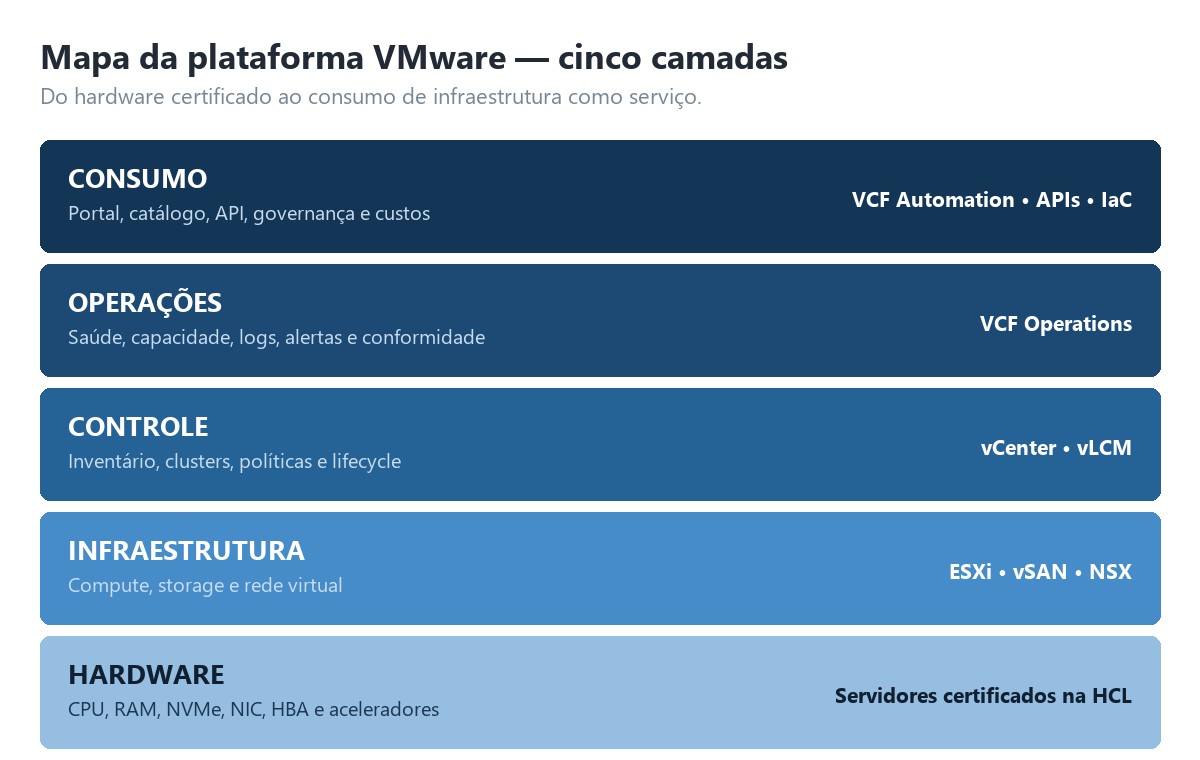
The VMware stack starts with ESXi, the bare-metal hypervisor installed directly on servers. vCenter Server adds inventory, policies, clusters, and distributed services. VVF packages the workload and HCI platform; VCF expands the set into a full-stack private cloud with software-defined networking, automation, fleet management, Kubernetes, and advanced services.
| Layer | Main function | Typical technologies |
|---|---|---|
| Consumption | Portal, catalog, API, governance, and costs | VCF Automation, APIs, IaC |
| Operations | Health, capacity, logs, alerts, and compliance | VCF Operations |
| Control | Inventory, clusters, policies, and lifecycle | vCenter, vLCM |
| Infrastructure | Compute, storage, and virtual networking | ESXi, vSAN, NSX |
| Hardware | CPU, RAM, NVMe, NIC, HBA, and accelerators | HCL-certified servers |
Decision in one sentence: choose VVF when the core need is managed virtualization and HCI; choose VCF when the goal is to operate an integrated, automated, multitenant, self-service-oriented private cloud.
Key capabilities
| Capability | What it delivers | Operational value |
|---|---|---|
| vMotion | Live migration of VMs between hosts | Maintenance without planned downtime |
| HA | Automatic restart after a host failure | Fast recovery |
| DRS | Resource-oriented load balancing | Better utilization and fewer hotspots |
| vSAN | Policy-based distributed storage | HCI and horizontal scale |
| VKS | Kubernetes integrated into the control plane | VMs and containers on the same platform |
| NSX / VPC | Software-defined networking and isolation | Agility and segmentation |
| VCF Operations | Observability, capacity, and diagnostics | Lower time to resolution |
| VCF Automation | Catalog, workflows, policies, and APIs | Self-service IaaS |
Three operational planes
- Data plane: VMs, containers, networks, and volumes run on the hosts.
- Control plane: vCenter, managers, and controllers maintain state, inventory, and policies.
- Management plane: Operations, Automation, and Fleet Management monitor, provision, and update the platform.
ESXi: the virtualization layer
ESXi provides workload isolation and schedules vCPUs onto physical CPUs, managing memory, devices, drivers, datastores, and virtual switches. Its design reduces the attack surface compared with a general-purpose operating system, but it demands discipline around firmware, compatibility, hardening, and lifecycle.
CPU and NUMA
- Size vCPU based on observed demand, not theoretical maximums. Oversized VMs may wait longer for scheduling.
- Keep critical VMs within a single NUMA node whenever possible; very wide VMs may access remote memory with higher latency.
- Analyze CPU Ready, Co-Stop, utilization, application latency, and effective frequency together.
Memory
- Avoid sustained pressure that triggers ballooning, compression, and swapping; host swap is the last resort and degrades latency.
- Reservations guarantee capacity, Limits impose a ceiling, and Shares define priority under contention.
- Factor in hypervisor overhead, agents, vSAN, and infrastructure services when calculating cluster capacity.
Virtual networking
| Element | Use | Recommendation |
|---|---|---|
| Standard vSwitch | Isolated host or simple environment | Good for small scale; per-host configuration |
| vSphere Distributed Switch | Centralized policy and advanced features | Preferable in enterprise clusters |
| Port group | VLAN and logical policy | Standardize names and IDs |
| vmkernel | Management, vMotion, vSAN, NFS, FT | Separate traffic and apply redundancy |
| NIC teaming | Availability and distribution | Validate failover with the physical switches |
Storage and lifecycle
ESXi can consume VMFS over FC/iSCSI SAN, NFS, and vSAN. The choice must balance latency, throughput, resilience, operations, backup integration, and cost. A VM uses configuration files, virtual disks, temporary snapshots, and logs — snapshots are not a substitute for backup. For lifecycle management, validate hardware, firmware, drivers, and the compatibility matrix; define the desired image in vSphere Lifecycle Manager; test on a pilot group; enter maintenance mode by evacuating workloads; and validate health, network, storage, alarms, and performance after the change.
A metric that matters: IOPS without block size, read/write ratio, queue depth, and latency is an incomplete number. Record the workload’s entire profile.
vCenter Server: central control
The vCenter Server Appliance centralizes hosts, VMs, templates, tags, permissions, clusters, and tasks. It is not in the I/O path of VMs: if vCenter stops, workloads continue running, but management functions and dependent services become limited. Its recovery must be planned and tested.
| Inventory object | Responsibility |
|---|---|
| Datacenter | Logical container for clusters, hosts, networks, and datastores |
| Cluster | Domain for HA, DRS, EVC, and lifecycle |
| Resource pool | Hierarchical reservation, limit, and priority |
| Folder | Organization and permission scope |
| Tag / Category | Metadata for policy, automation, and governance |
| Content Library | Templates, OVFs, ISOs, and content distribution |
vCenter high availability
Protect the appliance with native file-based backup to an external destination, cluster HA, and a coherent copy of configurations. The strategy should include restoring the appliance, DNS, NTP, certificates, break-glass credentials, and identity dependencies. Avoid creating a circular dependency in which the only DNS, AD, or repository needed to recover vCenter is unavailable within the very environment affected.
Administration antipatterns
- Running day-to-day operations with administrator@vsphere.local.
- Granting a global role when the operator only works within a single folder or cluster.
- Using the same technical account for backup, monitoring, and automation.
- Keeping certificates, DNS, and NTP without validity and availability monitoring.
- Relying solely on an appliance snapshot instead of a restorable native backup.
RBAC principle: assign corporate groups to minimum roles at the correct scope. Avoid granting permissions directly to users and do not use Administrator for daily tasks.
Licensing: VCF versus VVF
The current model is a per-physical-core subscription. For each physical CPU on an ESXi host, a minimum of 16 licensable cores applies, even if the processor has fewer. All physical cores running the software must be counted. Commercial terms, term length, support, and add-ons must be confirmed in the applicable proposal.
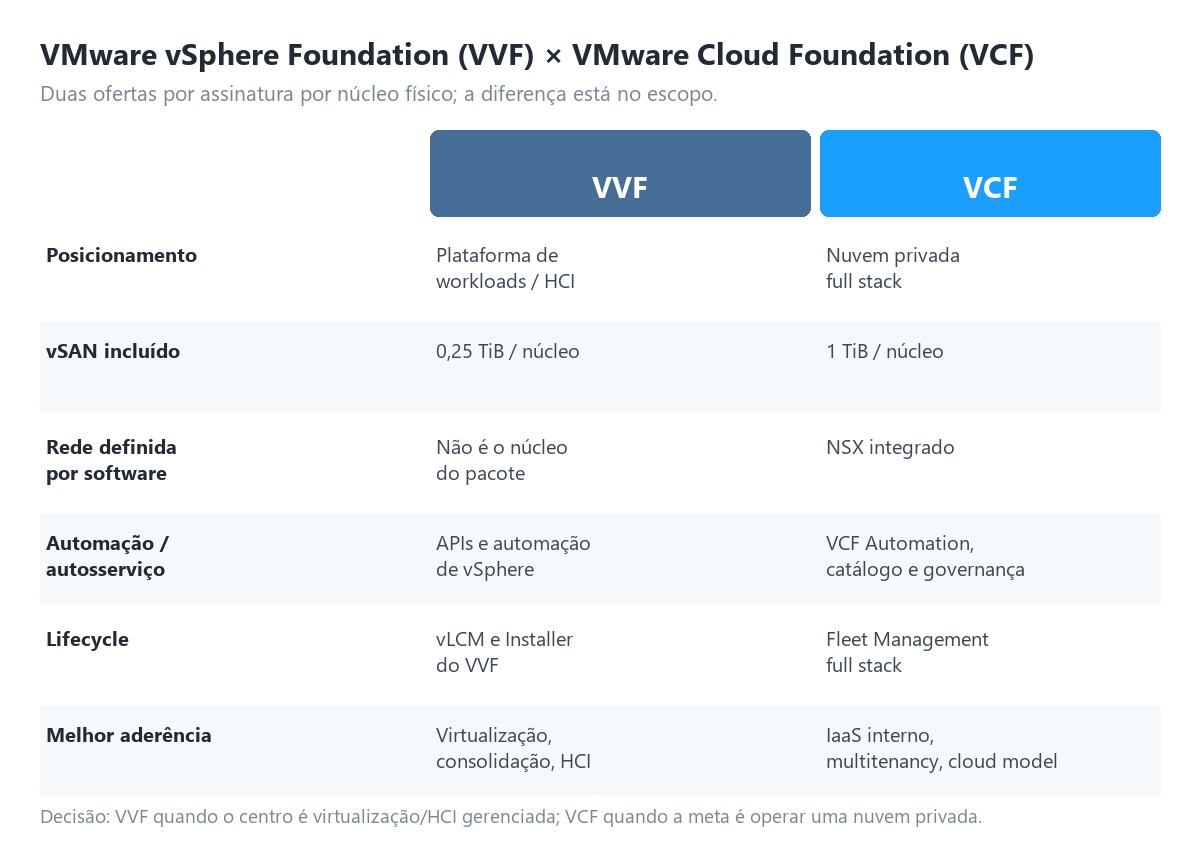
| Criterion | VMware vSphere Foundation (VVF) | VMware Cloud Foundation (VCF) |
|---|---|---|
| Positioning | Workload / HCI platform | Full private cloud platform |
| Compute | vSphere Enterprise Plus + vCenter Standard | vSphere integrated into the VCF stack |
| Included storage | 0.25 TiB vSAN per core | 1 TiB vSAN per core |
| Software-defined networking | Not the core of the package | Integrated NSX |
| Operations | VCF Operations for infrastructure | Unified full-stack operations |
| Automation / self-service | vSphere APIs and automation; smaller scope | VCF Automation, catalog, and governance |
| Lifecycle | vLCM and VVF Installer | Fleet Management and full-stack lifecycle |
| Kubernetes | VKS included | VKS integrated into the private cloud |
| Best fit | Virtualization, consolidation, HCI | Internal IaaS, multitenancy, networking/security, and cloud operating model |
Core count formula
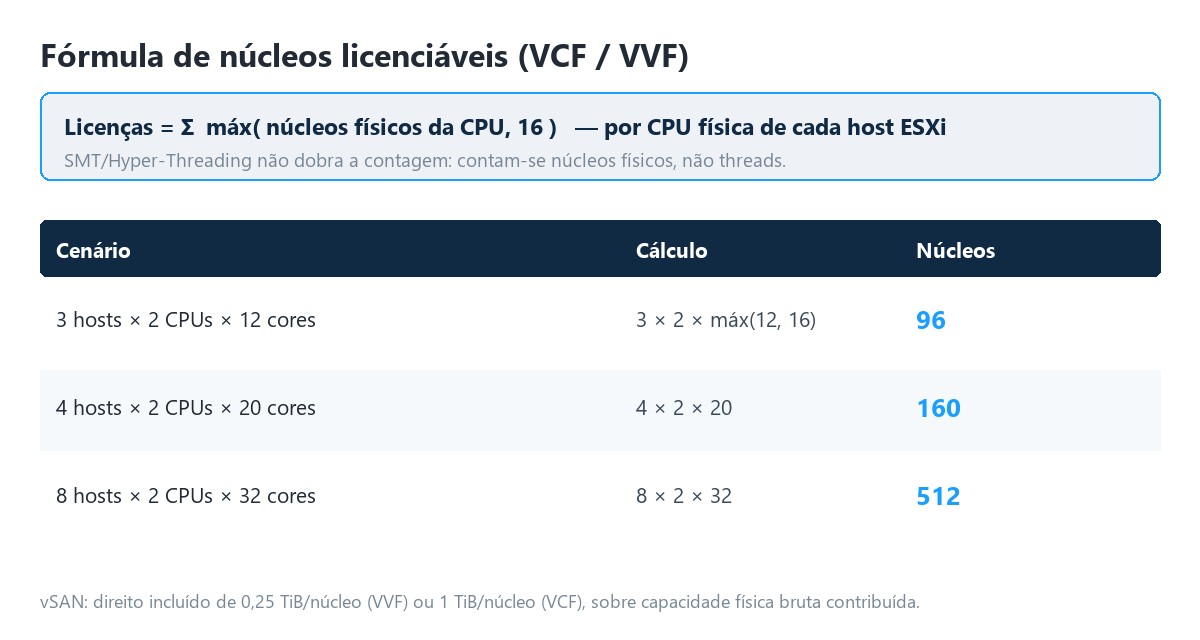
| Scenario | Calculation | Licensable cores |
|---|---|---|
| 3 hosts, 2 CPUs/host, 12 cores/CPU | 3 × 2 × max(12, 16) | 96 |
| 4 hosts, 2 CPUs/host, 20 cores/CPU | 4 × 2 × 20 | 160 |
| 8 hosts, 2 CPUs/host, 32 cores/CPU | 8 × 2 × 32 | 512 |
vSAN example
A cluster with 4 hosts, 2 CPUs of 20 cores per host: 160 cores. The included entitlement is 40 TiB under VVF and 160 TiB under VCF. If the cluster contributes 120 TiB raw to vSAN, VVF would require 80 TiB in addition; VCF would have coverage included, subject to the applicable terms. Licensing considers the raw physical capacity contributed, not the usable space shown after policies and overhead.
VCF 9: license management
- A single license file and a consolidated view in VCF Operations, replacing multiple per-component keys.
- Connected or disconnected / air-gapped mode.
- Usage submission and updates within each 180-day window.
- Without usage data, existing workloads continue running, but management may go disconnected and new workloads can no longer be created, per the official VCF 9 overview.
Commercial caution: do not estimate TCO simply by multiplying a “price per core” found online. Include subscription term, support, add-ons, excess vSAN, certified hardware, services, taxes, exchange rate, migration, and operations.
Decision tree
- Do you just need to consolidate VMs, HA/DRS, vMotion, external storage, or simple HCI? Start by evaluating VVF.
- Do you need integrated NSX, VPCs, self-service, catalog, governance, and full-stack lifecycle? Evaluate VCF.
- Do you need high vSAN density? Compare VVF’s 0.25 TiB/core entitlement with VCF’s 1 TiB/core and the add-ons.
- Do you need DR, advanced security, load balancing, or ransomware protection? Check the advanced services; not everything is part of the core.
Management dashboards and observability
The right dashboard depends on the question. vSphere Client is excellent for administering objects and tasks. VCF Operations correlates health, capacity, cost, alerts, and trends. VCF Automation delivers a catalog and consumption governance. Fleet Management organizes the stack’s lifecycle.
| Dashboard | Primary user | Questions answered |
|---|---|---|
| vSphere Client | Virtualization administrator | Which VM, host, network, or datastore needs action? |
| VCF Operations | NOC, SRE, capacity, FinOps | Where is there risk, waste, anomaly, or saturation? |
| VCF Automation | DevOps, platform team, internal users | How to request and govern infrastructure as a service? |
| Fleet Management | Platform team | Which instances, versions, credentials, and updates make up the fleet? |
| Business Services Console | Subscription management | What license allocation and consumption exist? |
Recommended operational dashboard
| Block | Indicators |
|---|---|
| Availability | Disconnected hosts, HA admission control, VMs without redundancy, hardware failures |
| CPU | Usage, Ready, Co-Stop, contention, frequency, and NUMA |
| Memory | Consumed, Active, balloon, compression, swap, and reservations |
| Storage | Read/write latency, IOPS, throughput, congestion, capacity, and resync |
| Network | Drops, errors, saturation, failover, latency, and loss |
| Capacity | Days remaining, reclaim, growth, N+1/N+2 headroom |
| Experience | Provisioning time, workflow failures, incidents, and SLO |
Avoid noise: a dashboard with 200 ownerless alerts is decoration. Consolidate correlated symptoms, define SLOs, and generate tickets only when there is a clear action — with symptom, probable cause, context, and action (runbook, owner, priority, and closure criteria).
Active Directory, Entra ID, and Azure
“Azure AD” has been renamed Microsoft Entra ID. vCenter can federate authentication with corporate providers, enabling SSO and modern policies. Traditional Active Directory remains relevant in on-premises environments. The architecture must distinguish authentication, authorization, and identity synchronization.
| Model | When to use | Points of attention |
|---|---|---|
| AD over LDAP | Local AD and classic integration | TLS, certificates, bind accounts, and DC dependency |
| Integrated Windows Authentication | Specific legacy cases | Evaluate support and product direction |
| AD FS | Federation already standardized on AD FS | Farm availability, claims, and certificates |
| Microsoft Entra ID | Cloud identity, MFA, and conditional access | Enterprise application, groups, claims, and emergency accounts |
| Okta / PingFederate | Alternative corporate IdP | Group mapping and certificate cycle |
Recommended flow with Entra ID
- Create and authorize the enterprise application according to the vCenter version’s documentation.
- Configure the identity provider in vCenter and validate URLs, tenant, client ID, and certificates/secrets when applicable.
- Map Entra ID groups to vCenter roles with least privilege.
- Apply MFA and Conditional Access at the IdP, with controlled exceptions only for recovery.
- Test login, logout, expiration, group removal, IdP unavailability, and the break-glass account.
Group example
| Corporate group | Suggested role | Scope |
|---|---|---|
| GG-VMW-Platform-Admins | Platform administrator | vCenter/Datacenter, restricted group |
| GG-VMW-VM-Ops | Custom VM operator | Production folders/resource pools |
| GG-VMW-Auditors | Read-only + events | Datacenter |
| GG-VMW-Backup | Minimum permissions for the backup product | Necessary objects |
| GG-VMW-Developers | Catalog consumer | Projects/organizations in Automation |
Important boundary: connecting vCenter to Entra ID does not “move VMware to Azure” — it is identity federation. Workload extension, DR, or operation in public cloud are separate architectural decisions. Keep at least two local recovery accounts protected in a vault that work even if DNS, AD, Entra ID, or external connectivity fail.
Orchestration, automation, and APIs
Automation executes tasks; orchestration coordinates multiple tasks, dependencies, approvals, policies, rollback, and state. In VCF, the goal is to turn infrastructure into a consumable service with guardrails, not just to write VM-creation scripts.
| Layer | Tools | Example |
|---|---|---|
| API / SDK | vSphere API, REST, Unified SDK | Create a VM and query inventory |
| CLI | PowerCLI, govc, esxcli | Reports and batch operations |
| IaC | Terraform providers | Declare networks, VMs, and policies |
| Workflow | VCF Automation Orchestrator | Approval, IPAM, DNS, CMDB, and rollback |
| Catalog | VCF Automation | Blueprint/templating and self-service |
| Guest configuration | Ansible, scripts, cloud-init | Install middleware and apply baseline |
Best practices
- Idempotency: repeating an action must not create duplicates or corrupt state.
- Secrets: use a vault, rotation, and service identities; never embed passwords in code.
- Mandatory tags: owner, application, environment, data-class, backup-policy, cost-center, and expiry.
- Git: version templates and workflows, review via pull request, and promote across environments.
- Observability: log requester, parameters, steps, return, and correlation ID.
- Rollback: distinguish reversible from destructive actions and require appropriate approval.
Minimum catalog governance
| Control | Implementation |
|---|---|
| Quota | Limit per project, environment, and resource class |
| Approval | Only when risk, cost, or privilege justifies it |
| Expiration | Default TTL for labs and review before renewal |
| Evidence | Owner, ticket, template version, and workflow result |
| Decommissioning | Final backup when needed, DNS/IP revocation, and CMDB write-off |
Expected outcome: a standardized request can drop from days to minutes, but the correct KPI includes success rate, compliance, rework, cost, and recovery time — not just speed.
Performance, sizing, and benchmarks
Performance must be measured end to end. The hypervisor can be healthy while the database, network, or storage limits the application. Use baselines, percentiles, and controlled tests; averages hide spikes.
| Domain | Indicator | Investigation signal |
|---|---|---|
| CPU | CPU Ready | Sustained growth with application latency |
| CPU | Co-Stop | Wide SMP VM waiting for scheduling |
| Memory | Balloon / Swap | Real pressure or inadequate reservations |
| Storage | Guest/kernel/device latency | Locate the queue and the limiting layer |
| Storage | IOPS + block size + R/W | Characterize the demand, not just the volume |
| Network | Drop / error / throughput | Queue, MTU, driver, uplink, or congestion |
| vSAN | Congestion / resync | Impact of rebuild, policy, or device |
Example 1: general virtualization cluster
Four hosts, each with 2 CPUs of 24 cores and 512 GB of RAM. Gross total: 192 cores and 2,048 GB. Reserving one host for N+1 failure, the approximate operational capacity is 144 cores and 1,536 GB before overhead. With 120 VMs averaging 2 vCPU and 8 GB, there are 240 vCPU and 960 GB configured. The operational vCPU:pCore ratio is 1.67:1, and configured memory occupies 62.5% of N+1 capacity.
| Item | Value | Reading |
|---|---|---|
| Gross CPU | 192 cores | 4 × 2 × 24 |
| N+1 CPU | 144 cores | 3 hosts available |
| Configured vCPU | 240 vCPU | 120 × 2 |
| N+1 vCPU:pCore ratio | 1.67:1 | Conservative for a mixed workload |
| N+1 RAM | 1,536 GB | Before overhead |
| VM RAM | 960 GB | Nominal headroom of 576 GB |
Example 2: transactional storage
Peak demand of 80,000 IOPS, 8 KiB block, 70% read and 30% write. Approximate logical throughput: 80,000 × 8 KiB = 625 MiB/s. The architecture must sustain the pattern with compatible latency, device failures, and protection policy. Also test rebuild/resync, snapshots, and backup, since steady state alone does not represent real-world operation.
Example 3: vendor-published targets
| Published metric | Reference value | Context |
|---|---|---|
| End-to-end migration | Up to 65% faster | Parallel DRS vMotion processing |
| Source CPU in encrypted vMotion | Up to 70% lower | Intel QAT hardware offload on compatible hardware |
| “Monster VM” scale | Up to 960 vCPU and 16 TB RAM | Current VVF generation limit |
| Gain on 4-socket systems | Up to 68% | Topology/NUMA-aware scheduling |
| vGPU vMotion | Up to 6× faster | Offload and higher-bandwidth networks |
| Troubleshooting | Up to 60% less effort | Full-stack proactive diagnostics |
Beware of “up to”: these values depend on hardware, version, and methodology and should not be added together to form a business case. Run a PoC with the real profile and defined acceptance criteria — set an SLO and hypothesis, capture a production baseline, reproduce CPU/memory/I/O/network and concurrency, test steady state, peak, maintenance, failure, and recovery, and compare percentiles, not just the average.
Networking, storage, availability, and DR
A resilient platform is designed starting from acceptable impact, not from a product list. Translate criticality into SLO, RPO, and RTO, and only then choose HA, replication, backup, and DR.
| Traffic | Function | Recommended practice |
|---|---|---|
| Management | Host and appliance management | Redundancy, ACLs, and controlled administrative access |
| vMotion | Memory/state migration | High bandwidth, low latency, and isolation |
| vSAN | Cluster I/O and resync | Dedicated/logical network, compatibility, and headroom |
| Storage IP | NFS / iSCSI | Multipathing, queues, consistent MTU, and QoS when needed |
| Workloads | Applications and tenants | Segmentation, policies, and observability |
| Backup / replication | Copy and DR | Avoid competing with production during critical windows |
Availability
- N+1 protects against a single host failure; N+2 may be needed during maintenance or in critical clusters.
- HA restarts VMs — it does not equal uninterrupted continuity. Fault Tolerance addresses specific cases with its own requirements.
- Admission Control must reserve failover capacity; disabling it masks the risk.
- Stretched clusters reduce RTO for site failure, but require compatible latency, witness, network, and dependency design.
Backup and DR
| Mechanism | Protects against | Does not replace |
|---|---|---|
| HA | Host failure | Backup or site-level DR |
| vMotion | Planned maintenance | Replication or backup |
| Snapshot | Short-term change | Independent backup |
| Replication | Site/array loss depending on design | Immutable copy against corruption/ransomware |
| Immutable backup | Deletion, corruption, and ransomware | Continuity plan and restore capability |
| SRM / DR orchestration | Failover sequencing and testing | Infrastructure and data at the destination |
The real test: RPO and RTO are only reliable after a test that restores applications, identity, DNS, network, secrets, and integrations — not just powering on VMs. The test should cover simultaneous host and storage-path failure at peak, vCenter/DNS/NTP/IdP/KMS unavailability during recovery, site loss with partial isolation, isolated restore after ransomware, and return to the primary site.
Security, hardening, and operations
Security in VMware spans hardware, ESXi, vCenter, network, identities, VMs, automation, and the supply chain. The goal is to reduce the attack surface, limit lateral movement, detect drift, and recover quickly.
| Control | Implementation |
|---|---|
| Identity | Federation, MFA, groups, least privilege, and break-glass |
| Management plane | Dedicated network, jump host / PAM, ACLs, and centralized logs |
| Host | Secure Boot, TPM 2.0, lockdown when applicable, minimal services |
| Encryption | Up-to-date TLS, VM/vSAN encryption, and highly available KMS |
| Network | Segmentation, distributed firewall / add-ons per license |
| Lifecycle | Patches, HCL, desired images, and remediation window |
| Auditing | Events, changes, login, tasks, configuration, and retention |
| Recovery | Immutable backups, tested restore, and credentials outside the failure domain |
Day 2 routine
- Daily: critical alarms, failover capacity, backups, hardware, and failed tasks.
- Weekly: anomalies, old snapshots, orphaned VMs, datastore, resync, and urgent patches.
- Monthly: capacity forecast, license entitlements, privileged accounts, certificates, and sample restores.
- Quarterly: DR test, RBAC review, firmware/HCL, runbooks, and dependency risks.
- Annually: architecture, contract, TCO, hardware cycle, SLOs, and modernization plan.
Reference architectures and deployment
Pattern A — VVF with external storage
| Component | Design |
|---|---|
| Compute | 4 to 8 ESXi hosts, N+1, compatible CPUs, and RAM according to profile |
| Control | vCenter + VCF Operations |
| Storage | Redundant FC/iSCSI SAN or NFS; multipathing |
| Network | vDS, redundant uplinks, and segregated VLANs |
| Use | VM consolidation, ERP, databases, middleware, and VDI |
Pattern B — VVF HCI with vSAN
| Component | Design |
|---|---|
| Cluster | Technical minimum per architecture; 4+ hosts is common for margin |
| Storage | vSAN ESA/OSA depending on hardware and compatibility |
| Management | vCenter + Operations + SPBM |
| Scale | Add nodes or use storage cluster / disaggregated per support |
| Use | Simplified operation of compute and storage in one cluster |
Pattern C — VCF private cloud
| Component | Design |
|---|---|
| Management domain | Control, management, and lifecycle services |
| Workload domains | Clusters separated by SLA, hardware, tenant, or purpose |
| Network | NSX, VPCs, overlays, and gateways per architecture |
| Consumption | Automation, catalog, projects, quotas, and policies |
| Operations | Operations, Fleet Management, logs, and integrations |
| Use | Private cloud, internal IaaS, modern apps, Kubernetes, and private AI |
Design rule: do not start with the number of hosts. Start with the workload, failure domain, SLA, growth, compatibility, operations, and licensing — hardware is the consequence. The phases are assessment, HLD, LLD, build, validate, migrate, and operate.
Migration, costs, and checklist
| Strategy | Advantage | Risk / limitation |
|---|---|---|
| vMotion / cross-vCenter | Low disruption when compatible | Network, latency, versions, EVC, and storage |
| HCX | Mobility at scale and network extension | Appliance planning and throughput |
| Backup / restore | Independent and verifiable | Copy window and time |
| Replication | Reduced RPO and controlled cutover | Consistency and bandwidth |
| Rebuild | Modernizes OS and configuration | More application and testing effort |
3-year TCO model
| Category | Items |
|---|---|
| Software | VCF/VVF, additional vSAN, advanced services, backup, observability |
| Hardware | Hosts, disks, switches, optics, SAN, support, and parts |
| Facilities | Rack, power, cooling, space, and connectivity |
| Services | Assessment, deployment, migration, training, and support |
| Operations | Staff, on-call, patches, capacity, audit, and incidents |
| Risk | Downtime, lock-in, delay, rework, and obsolescence |
VVF × VCF decision checklist
- Inventory of hosts, sockets, cores, and raw vSAN capacity completed.
- Workloads classified by criticality, RPO, RTO, CPU, RAM, I/O, network, and growth.
- Need for NSX, microsegmentation, VPCs, and multitenancy validated.
- Need for catalog, self-service, quotas, chargeback, and APIs validated.
- Advanced services separated from the core and confirmed in the proposal.
- 3-to-5-year TCO including hardware, migration, operations, support, exchange rate, and taxes.
- PoC measuring percentiles, failure, maintenance, backup, and restore.
- Exit/mobility plan and data portability documented.
Essential glossary
| Term | Short definition |
|---|---|
| ESXi | Bare-metal hypervisor of the vSphere platform. |
| vCenter | Central plane for management, inventory, and policies. |
| VCF | VMware Cloud Foundation; full-stack private cloud platform. |
| VVF | VMware vSphere Foundation; workload / HCI platform. |
| vSAN | Software-defined storage integrated into vSphere. |
| NSX | Software-defined networking and security. |
| VKS | vSphere Kubernetes Service. |
| DRS | Distributed Resource Scheduler. |
| HA | High Availability; automatic restart after failure. |
| SPBM | Storage Policy-Based Management. |
| RPO | Maximum acceptable data loss. |
| RTO | Maximum time to restore service. |
| HCL | Hardware/software compatibility list. |
| EVC | CPU compatibility for mobility between hosts. |
| NUMA | Non-uniform memory architecture in multiprocessor servers. |
Conclusion
ESXi and vCenter remain the robust foundation for enterprise virtualization. VVF organizes that foundation as a modern workload and HCI platform. VCF adds the private cloud operating model: integrated networking, full-stack management, fleet lifecycle, automation, self-service, and governance. The right choice is not “which has more features,” but which fits the organization’s operating model, risk, and TCO.
Practical recommendation: for a traditional VM environment with a central team and external storage, VVF tends to be the natural starting point. To offer internal IaaS, multiple tenants, Kubernetes, end-to-end automation, and software-defined networking, VCF tends to reduce manual integrations — provided the organization adopts platform processes and actually uses these capabilities.
Official sources and further reading
This material was prepared from official Broadcom/VMware sources, with a cutoff date of September 2, 2026. Always consult the applicable release notes, interoperability matrices, the VMware Compatibility Guide, the Product Guide, and the current commercial proposal.
- Licensing for VMware Cloud Foundation 9.0
- VMware Cloud Foundation 9.x — Data Sheet
- VMware vSphere Foundation — Data Sheet
- Feature Comparison & Upgrade Paths: VCF and VVF
- Counting Cores for VCF/VVF and TiBs for vSAN — Broadcom KB 313548
- VCF 9.0 Product Subscription and Licensing
- vCenter identity federation with Microsoft Entra ID
- Performance Best Practices for VMware vSphere 8
- Operations in VMware Cloud Foundation 9.0
- Five reasons to upgrade from VVF to VCF
Editorial note
Names, brands, and products belong to their respective owners. The numerical capacity and performance examples were organized for didactic purposes and do not constitute a quote, lab benchmark, or licensing advice — final sizing and economics depend on the actual hardware, SLA, and commercial contract of each project.
EnQ Digital: Cloud • Data Center • Baremetal • Storage • Support • Security