
Proxmox Virtual Environment (PVE) is a virtualization and container platform based on Debian GNU/Linux, published as free software under the GNU AGPLv3 license. This technical guide brings together, in a single piece, the cluster architecture, storage, network, backup, identity, security, automation and licensing of the Proxmox ecosystem in its September 2026 edition — based on Proxmox VE 9.2, Proxmox Backup Server 4.2 and Proxmox Datacenter Manager 1.1.
About this material: the performance examples cited are lab results published by Proxmox itself, not SLA promises — CPU, NUMA, controller, SSD/NVMe, firmware, network, MTU, queues, workload and replica policy radically change the results. As repositories, kernels, QEMU, LXC and Ceph evolve continuously, always validate the release notes before a deployment or upgrade.
Proxmox in 2026: platform and ecosystem
Proxmox VE combines KVM for virtual machines and LXC for Linux containers in a single interface, integrating cluster, high availability, software-defined storage, network and disaster recovery.
| Component | Base version | Role |
|---|---|---|
| Proxmox VE | 9.2 | Hypervisor, containers, cluster, HA, SDN and storage |
| Proxmox Backup Server | 4.2 | Incremental backup, deduplication, verify, sync and restore |
| Proxmox Datacenter Manager | 1.1 | Centralized management of multiple clusters/sites |
| Ceph | Tentacle 20.2 on PVE 9.2 | Integrated distributed storage |
| PVE 9.2 base | Debian 13.5 + kernel 7.0 | Host operating system |
| QEMU / LXC / ZFS | QEMU 11 / LXC 7 / ZFS 2.4 | Virtualization, containers and local storage |
In August 2026, Proxmox released an Arm64 edition of PVE 9.2, with declared functional parity in KVM, LXC, ZFS and Ceph for officially supported platforms such as NVIDIA Grace and Vera. Mixed x86-64/Arm64 clusters should not be assumed to be supported for production without specific validation.
Proxmox positions itself in five fronts: enterprise virtualization (Windows/Linux VMs with KVM/QEMU, VirtIO, UEFI, vTPM and PCIe passthrough), system containers (LXC sharing the host kernel, generally with low overhead), hyperconverged infrastructure (compute and Ceph on the same set of nodes), traditional infrastructure (Fibre Channel SAN, iSCSI, NFS and third-party storage), and multi-site management (the Datacenter Manager as a layer above independent clusters, without replacing each one's local control plane).
Fundamentals: KVM, LXC and host architecture
In the VM path, KVM provides hardware-assisted virtualization in the Linux kernel and QEMU implements the machine model and virtual devices. VirtIO devices reduce emulation overhead for modern workloads. CPU model choice influences performance and migration: using "host" maximizes exposure to CPU features, while models compatible across nodes broaden portability.
LXC containers do not emulate a full kernel: the processes share the host kernel, isolated by namespaces, cgroups, AppArmor/seccomp and resource limits. This reduces runtime cost, but restricts the guest to Linux and increases the importance of host hardening.
Among PVE's essential services are pveproxy (HTTPS/API on port 8006 and the GUI front-end), pvedaemon (privileged execution of operations), pvestatd (periodic status collection), pve-cluster/pmxcfs (distributed configuration mounted at /etc/pve), corosync (membership, messaging and quorum), pve-ha-crm/pve-ha-lrm (coordination and execution of HA resources), plus the VM management (qemu-server/qm) and container management (pve-container/pct) tools.
The core engineering principle: do not depend on the physical node as the unit of the application. The node should be treated as a replaceable part of the cluster — identity and persistent state must live in storage, network, backup and distributed configuration.
Management panel: GUI and Datacenter Manager
The web interface is integrated into PVE itself: no separate management appliance is required to operate a cluster. The model is multi-master — any node in quorum can offer the full cluster view, which removes the dedicated "manager node" as a single point of administration.
Proxmox Datacenter Manager (PDM) was created for distributed environments and large fleets. It connects "remotes" — PVE clusters, standalone nodes and PBS instances — and consolidates inventory, metrics, status, tasks, updates and lifecycle operations. The architecture is decoupled: PDM unavailability does not interrupt the VMs of the managed clusters. Its capabilities include a global dashboard, guest management across remotes, centralized snapshots, Ceph monitoring, central subscription registry, automated installation via answer files, cross-cluster migration and centralized visibility/execution of updates.
PDM does not replace PVE: advanced configurations may still require the remote's native GUI. Treat it as the global management plane, not a requirement for VMs to run.
Cluster, pmxcfs, Corosync and quorum
Cluster does not automatically mean HA. For automatic restart of guests after a failure, healthy quorum, accessible storage and resources registered in HA must be combined.
The Proxmox Cluster File System (pmxcfs) is a userspace filesystem mounted at /etc/pve. It replicates configurations in real time between nodes via Corosync, performs consistency checks, and becomes read-only when a node loses quorum. All the configuration of VMs, storages, users, firewall, HA and SDN lives in this control plane.
| Topology | Effective votes | Tolerable failure before losing majority | Comment |
|---|---|---|---|
| 2 nodes | 2 | 0 without qdevice | Use a qdevice for a third vote in production |
| 3 nodes | 3 | 1 | Classic minimum standard for HA |
| 5 nodes | 5 | 2 | Higher failure margin |
| 7 nodes | 7 | 3 | Common in larger clusters; still requires network design |
Quorum protects against split-brain: if a network partition leaves subsets of the cluster without a majority, those sides must not continue making conflicting decisions about the same resources. For Corosync, use a stable, low-latency network (jitter and loss matter as much as bandwidth), separate storage and VM traffic from cluster traffic whenever possible, implement redundant Corosync/Knet links and avoid stretching a single cluster over a high-latency WAN without a specific analysis of failure domains.
High availability and Dynamic Load Balancer
When a node fails, HA attempts to recover the configured services by starting them on eligible nodes — this is not "zero downtime": there is an interval for detection, fencing/lock and guest boot. Application-level zero downtime requires mechanisms within the software itself, such as replicated databases, application clusters or a load balancer with multiple instances.
HA's internal components include the CRM (Cluster Resource Manager, which decides the desired state and coordinates resources in the cluster), the LRM (Local Resource Manager, which executes start/stop/migrate locally), watchdog/fencing (prevents two nodes from running the same resource in failure scenarios), HA rules/groups (restrict placement and affinities) and the maintenance workflow (prepares a node for maintenance without losing operational state).
PVE 9.2 adds a Dynamic Load Balancer tied to the Cluster Resource Scheduler (CRS), which improves workload placement and rebalances guests according to utilization and rules — infrastructure balancing, not application autoscaling.
N-1 capacity: if the cluster normally runs at 85–90% of RAM or CPU, HA may exist "on paper" and fail in practice due to lack of destination capacity. Production sizing must reserve capacity for the largest planned failure.
Network: bridges, VLAN, SDN, EVPN/BGP and WireGuard
The Linux Bridge is the most direct path: physical NIC → vmbrX bridge → VirtIO interfaces of the VMs. With VLAN-aware, a trunk bridge can carry multiple VLANs and each guest receives a tag — simple, efficient and suitable for many enterprise environments.
In bonding, active-backup offers simple redundancy without depending on LACP, while 802.3ad/LACP aggregates links and distributes flows (as long as the switch is correctly configured). A single TCP flow typically does not use the sum of all links, since hashing tends to keep the flow on a single bond member.
PVE's SDN allows creating zones and VNets centrally. The stack has evolved to VXLAN/EVPN, BGP and, in 9.2, WireGuard fabrics and more granular routing policies — growing use in multi-tenant, edge and environments where the virtual network needs to keep up with workload lifecycle.
| Technology | Use when | Point of attention |
|---|---|---|
| VLAN | Traditional L2 segmentation | Scale limited by the L2 domain and VLAN IDs |
| VXLAN | Overlays and multi-tenant | Requires consistent IP underlay and coherent MTU |
| EVPN/BGP | Distributed reachability control | Requires a well-operated routing domain |
| WireGuard Fabric | Secure connectivity between endpoints/sites | Plan MTU, keys and routes |
| Distributed firewall | Policy close to the guest | Rules and objects need governance |
Storage: ZFS, NFS, SAN/iSCSI/FC and plugins
Local-LVM, LVM-thin and ZFS deliver low latency and simplicity per host. The trade-off is mobility: live migration of a VM with local disk needs to copy the storage, and HA depends on replication or another mechanism for the destination to have the data.
On ZFS, mirrors tend to deliver a superior IOPS profile compared to RAID-Z for VMs with random I/O with the same number of disks. Plan RAM for the ARC and avoid hardware RAID underneath ZFS when the goal is for ZFS itself to control the disks. PVE's ZFS replication is useful for DR/HA with periodic RPO, but does not replace synchronous shared storage.
| Backend | Model | Strengths | Risks / limits |
|---|---|---|---|
| NFS | File | Simple, broad support, snapshots depending on NAS | Server/array needs to be HA and properly sized |
| iSCSI + LVM | Block | Traditional SAN, multipath, predictable performance | LUN/path operation and array dependency |
| Fibre Channel | Block | Low latency, zoning and mature SAN | Fabric cost/complexity and multipath |
| Ceph RBD | Distributed | No central array, self-healing, scale-out | Network and operation are critical |
| Local ZFS | Local | Latency, snapshots, SAN independence | Disk migration and HA require an additional strategy |
When all nodes access the same shared volume, normal migration does not need to transfer the VM's disk — mainly memory and CPU/device state are migrated, drastically reducing the volume of data on the migration path.
Hyperconverged Ceph in depth
Ceph eliminates the central array, but trades simplicity for distribution, consensus and replica traffic. Its main components are the MON (maintains the Ceph cluster's maps and quorum), the MGR (metrics and management modules), the OSDs (store objects and participate in replication/recovery), CRUSH (algorithm that determines placement based on rules and failure domains), RBD (block device for VM disks) and CephFS (distributed POSIX filesystem).
In a replicated pool with size=3, a logical piece of data is stored on three distinct OSDs/failure domains, so an initial approximation of logical capacity is raw/3, before reserves, metadata and operational headroom:
| Example | Calculation | Result |
|---|---|---|
| 3 nodes × 4 NVMe × 3.84 TB | 3 × 4 × 3.84 | 46.08 TB raw |
| Pool size=3 | 46.08 / 3 | 15.36 TB nominal logical |
| 75% operational target | 15.36 × 0.75 | 11.52 TB target occupancy |
Proxmox's official 2023/12 benchmark showed that 10 Gb/s can saturate with just one very fast SSD; 25 Gb/s can also become a bottleneck; 100 Gb/s partly shifted the bottleneck to the Ceph client in the tested environment. In 2026, this reinforces 25/100 GbE as the natural design for NVMe HCI, depending on the number of OSDs and the workload.
The failure of an OSD or node not only reduces redundancy: it triggers recovery traffic. The cluster needs to have spare bandwidth and IOPS to serve applications and recover replicas at the same time — so performance in a degraded state should be part of the acceptance test.
Ceph is not backup: replication protects against physical failure, but accidental deletion, ransomware or logical corruption are also replicated. Use Proxmox Backup Server and copies outside the cluster.
VM migration and CPU compatibility
In offline migration, the guest is shut down and moved. In live migration, the guest continues running while memory pages are copied and resent as they become "dirty" — the final switchover is short when the dirty-page rate converges below the transfer capacity.
Regarding CPU model: "host" maximizes feature exposure and potential performance, but reduces portability across different generations; a common/custom model defines a baseline for heterogeneous nodes and facilitates live migration. Before expanding the cluster, validate CPU flags, microcode and firmware — not just manufacturer and core count.
As a capacity exercise: a VM with 64 GiB migrating over a 25 GbE network with effective throughput of 2.7 GB/s would have a first pass of approximately 24 seconds. Transferring 1 TiB of disk over 25 GbE at an effective 2.5 GB/s has a theoretical floor of around 7 minutes — with shared storage, this disk volume typically stops being part of the migration.
Backup, restore and Proxmox Backup Server
High availability reduces downtime; backup reduces data loss and expands recovery options. PBS receives backups from VMs, containers and hosts, sends data incrementally and deduplicates chunks in the datastore — each snapshot still represents a complete backup from a restoration standpoint, with SHA-256 checksums for integrity verification and support for client-side encryption.
- Incremental + deduplication: reduces network and capacity consumed between backup points
- Verify jobs: detect corruption via checksums and periodic reading
- Prune + GC: apply retention and remove unreferenced chunks
- Sync jobs: replicate datastores/namespaces to another PBS
- Client-side encryption: the remote server can store data without knowing its content
- Tape: offline/air-gap physical layer for long retention
- S3-backed storage (new in version 4.2): expands the backend options for backup
The 3-2-1-1-0 rule applied: 3 copies of the data (counting production), 2 types/locations of media or failure domains, 1 off-site copy, 1 offline/immutable copy and 0 undetected errors — which requires verify jobs and real restore tests.
For quick sizing, PBS documentation recommends, for production, a modern CPU with at least 4 cores, a minimum of 4 GiB for system/cache/daemons and approximately 1 GiB of additional RAM per TiB of storage — a starting point, since dedup, verify, filesystem, parallelism and backup window may require more memory and IOPS.
RPO and RTO are business decisions: backups every 24 hours do not deliver an RPO of 15 minutes, and having a backup does not guarantee a low RTO if restoring hundreds of TB has never been rehearsed.
Identity: AD, LDAP and Microsoft Entra ID
Central authentication reduces local accounts, but RBAC remains Proxmox's authorization layer. Supported realms include pam (break-glass/Linux administration), pve (internal users), LDAP (generic directories), Active Directory (native integration with Microsoft's directory) and OpenID Connect (modern SSO via Entra ID, Keycloak or Google).
For Microsoft Entra ID, the modern design is OpenID Connect: PVE uses discovery based on the issuer URL, which in a Microsoft tenant normally follows the pattern https://login.microsoftonline.com/<tenant-id>/v2.0. PVE must be registered as a Web/confidential client application, Client ID and Client Secret configured, and the exact redirect URIs used by administrators registered.
Autocreate does not grant privileges: automatically creating the user after the first login does not mean making them an administrator. Define groups, roles and least-privilege ACLs, keep a local emergency user, and test the OIDC login before making it the default.
Best practices for Entra ID include using an app registration dedicated to the Proxmox environment (without reusing a secret from another application), valid DNS and TLS certificate for the admin URL, MFA/Conditional Access for administrators, client secret rotation with expiration monitoring, a dedicated security group with documented mapping, and testing identity provider failure — the operator must still be able to use a local break-glass account.
Security: RBAC, MFA, firewall, API tokens and hardening
The hypervisor is a privileged layer: reducing surface and privileges is mandatory. In Proxmox, permissions combine subject (user/group/token), role (set of privileges) and path (object) — Resource Pools help delegate sets of VMs and storages without granting access to the entire cluster.
TOTP and WebAuthn are common MFA mechanisms for local accounts; for OIDC, MFA is normally performed at the Identity Provider. Use API tokens for automation instead of human passwords — tokens can have privileges separate from the user and should receive only the necessary permissions, with secrets kept in a vault, never in scripts or Git repositories.
PVE's distributed firewall applies rules at the nodes and can operate at the Datacenter, Node and VM/CT levels, with Security Groups, IP Sets, aliases and macros reducing duplication. In multi-tenant environments, combine firewall, VLAN/VXLAN and RBAC — none of them alone represents complete segmentation.
The hardening checklist includes: management network outside the public internet with access via VPN/bastion; TLS with a trusted certificate and consistent DNS; SSH with keys and central logging; enterprise repository in production with a defined patching window; MFA for administrators and periodic review of ACLs/API tokens; reliable NTP (time affects cluster, logs, certificates and authentication); firmware/BMC isolated on a management network with their own credentials; and configuration backup with cluster recovery testing.
Orchestration and Infrastructure as Code
Proxmox provides primitives; automation turns those primitives into a repeatable service. The REST API exposes practically the same operations as the GUI, using JSON and a formal schema — the GUI itself is, in large part, a client of that API.
On the command line, the main tools are qm (VM lifecycle), pct (LXC container lifecycle), pvesh (local call to the API tree), pvesm (storage manager), pvecm (cluster and Corosync), pveum (users, groups, realms, ACLs and tokens) and ha-manager (HA resources and rules).
Proxmox itself positions Ansible and Terraform/OpenTofu as automation paths. In real projects, treat providers/collections as software components with a fixed version, tests and pipeline — do not mix manual changes and IaC without a clear ownership policy, because drift is inevitable.
It is important to stress that PVE is not Kubernetes: Proxmox orchestrates virtual infrastructure, while Kubernetes orchestrates containerized applications. The two can coexist — VMs on PVE host Kubernetes control planes/workers, while PVE handles lifecycle, HA, network and storage of the infrastructure.
Observability, logs, metrics and operation
A healthy cluster needs to be observable before the first failure. The domains to monitor include node (CPU, load, RAM, swap, temperature, filesystem), cluster (quorum, Corosync links, HA state), VM/CT (CPU, RAM, ballooning, disk throughput/latency), Ceph (HEALTH, OSD up/in, PG states, recovery/backfill), network (drops/errors, LACP, MTU mismatch) and PBS (job duration, dedup ratio, verify errors, restore tests).
PVE can send metrics to external systems, with broad integration with Zabbix, Prometheus/InfluxDB via exporters and Grafana, in addition to maintaining native RRD history for operational graphs.
As a suggested operational SLO: quorum in 100% of production periods (excluding planned maintenance); Ceph in HEALTH_OK as the expected state, with warnings generating a ticket; backup success measured by RPO, not just "job ran"; automated restore tests with measured RTO; and capacity alerts before 70–75% of RAM/storage in clusters without much slack.
Licensing and commercial subscription
Proxmox VE is free software under GNU AGPLv3. There is no "crippled" edition without a subscription: HA, live migration, cluster, backup, storage and networking features are available regardless of subscription level — the commercial subscription mainly differentiates the enterprise repository, support and SLA.
| Plan | €/socket/year | Tickets / published response | Typical use |
|---|---|---|---|
| Community | 120 | No support tickets | Lab, training and non-critical |
| Basic | 370 | 3 / 1 business day | Smaller production, self-sufficient team |
| Standard | 550 | 10 / 4 hours | Enterprise production with escalation |
| Premium | 1,100 | Unlimited / 2 hours | Mission critical and broader coverage |
Important rules: the occupied physical socket is counted (the number of cores does not change the price), all nodes of the same cluster must maintain the same subscription level, the subscription is annual, and the Basic/Standard/Premium plans include the Enterprise Repository and commercial support. PDM is open source — for enterprise PDM support, remotes with qualifying active subscriptions provide coverage without a separate key.
On September 2, 2026, Proxmox announced global 24/7 enterprise support starting October 19, 2026: Premium will have 24/7 from the start, Standard enters an onboarding window in the fourth quarter, and Basic retains its existing SLA. As of this material's cutoff date, the change had been announced but was not yet in effect.
Performance: benchmark, network, storage and latency
Performance in virtualization is a chain: guest → hypervisor → kernel → network/storage → hardware. In the 2023/12 benchmark of a hyperconverged cluster with fast SSDs, Proxmox reported 10 Gb/s easily saturated, 25 Gb/s also potentially becoming a bottleneck, and at 100 Gb/s a single client reaching up to approximately 6,000 MiB/s write and 7,000 MiB/s read — with multiple clients in parallel, up to approximately 9,800 MiB/s write and 19,500 MiB/s read.
These numbers are published lab results, not a product specification: an individual VM can be well below Ceph's aggregate throughput due to queue limits, iodepth, CPU, RBD, filesystem, block and application constraints.
Each workload profile prioritizes different metrics: OLTP databases prioritize p99 latency and fsync in 4K random; VDI prioritizes IOPS/latency during boot storms; backup prioritizes sequential throughput and deduplication CPU; AI/data workloads prioritize throughput, NIC and GPU passthrough/vGPU; and general web applications prioritize CPU scheduler and moderate latency.
Sizing: CPU, RAM, storage, network and N-1 reserve
There is no universal vCPU:pCPU ratio. As an engineering rule (not a PVE limit), critical and latency-sensitive workloads may stay close to 1:1 to 2:1, general servers frequently accept greater oversubscription, and dev/test environments can go further — the decisive indicator is the workload latency observed under real contention.
Guest memory is more rigid than CPU: excessive overcommit forces ballooning/swap and produces abrupt degradation. In HA clusters, it is necessary to calculate the most loaded node failing and redistribute its VMs among the survivors:
| Item | 3 nodes | After failure of 1 node |
|---|---|---|
| Physical RAM | 3 × 512 GiB = 1,536 GiB | 1,024 GiB available |
| Host/Ceph reserve | ~64 GiB per node (example) | ~128 GiB on the remaining 2 |
| Approximate usable RAM | 1,344 GiB under normal conditions | ~896 GiB after failure |
| Guest target for N-1 | ≤ ~896 GiB | Fits on the 2 survivors |
For storage, consider capacity (raw × protection efficiency × headroom), performance (IOPS and throughput per device, realistically multiplied by the RAID/Ceph topology), latency (measured at p95/p99 under load and during recovery, not just the average), endurance (DWPD/TBW of enterprise SSDs) and failure domain (chassis, node, rack, switch, PDU and site).
For network in hyperconverged environments, add up client traffic, replica, recovery and migration: a cluster with 25 GbE per node can have excellent normal performance and still suffer during backfill, live migration and backup coexisting — QoS, separate networks or 100 GbE may be economically justifiable in this scenario.
Reference architectures
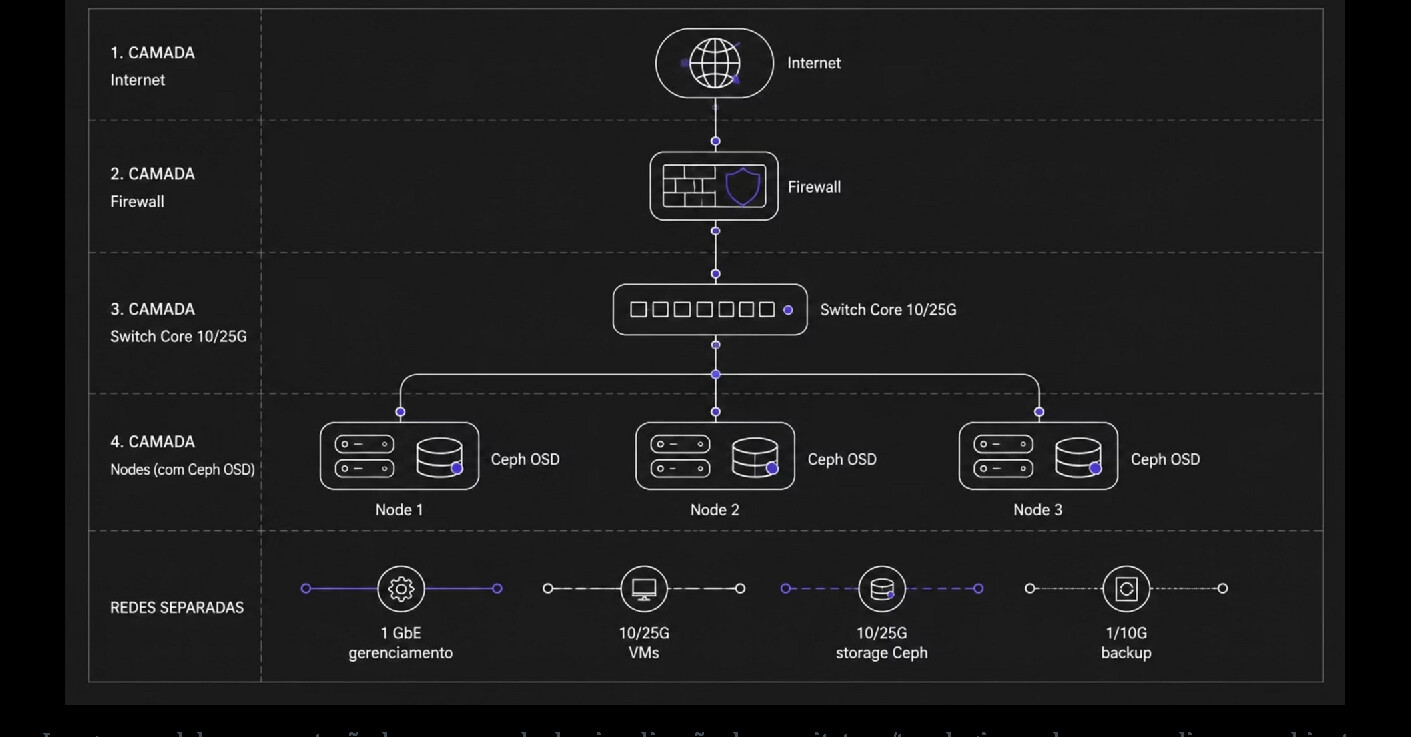
Three designs help turn requirements into concrete components. Scenario A, 3 hyperconverged nodes for production, combines 3 servers with ECC RAM and redundant power supplies, boot on mirrored SSDs, 4–8 enterprise SSD/NVMe per node for Ceph in JBOD/HBA IT mode, 2×25 GbE or 2×100 GbE networks for data with separate management, redundant Corosync links, PBS external to the cluster with an off-site copy, and validated N-1 capacity for critical HA guests.
Scenario B, 5 nodes with enterprise SAN, uses PVE as a compute cluster while keeping shared storage on an HA Fibre Channel/iSCSI array — reduces the complexity of operating Ceph and can be ideal when the company already masters SAN, has existing investments and requires specific array features.
Scenario C, 2 nodes with a qdevice at the edge, solves the quorum issue but does not create magic capacity: it requires redundant shared storage or ZFS replication with an explicit RPO — useful for branches/edge when three full servers are economically unfeasible.
For multi-site operations, maintain local clusters per site (latency and quorum), use PDM for a global view and operations, PBS Sync for off-site copies, and, when applicable, cross-cluster migration. Do not treat two distant sites as a single cluster just to "have geographic HA".
Migration from VMware/Hyper-V and modernization
Migration is not just converting disk: it involves network, drivers, CPU, backup, observability and rollback. PVE has mechanisms for importing ESXi/OVA guests in recent versions, but the production strategy still needs to map vNICs, VLANs, storage, snapshots, the switch from VMware Tools to QEMU Guest Agent/VirtIO, BIOS/UEFI and controller types.
Hyper-V VMs normally require conversion/import of VHD/VHDX disks and adjustment of drivers/controllers — for Windows, VirtIO must be prepared and boot, network, activation and applications validated before the first production window.
The recommended phases are: discovery (inventory, dependencies, RTO/RPO, VLANs, storage and licenses); landing zone (PVE cluster, networks, storage, DNS/NTP, identity, backup and observability); pilot (non-critical workloads and performance/rollback tests); waves (migration by dependency groups, with a window and success criteria); optimization (CPU models, VirtIO, cache, backup, HA and rightsizing); and decommission (only after retention/rollback and business validation).
Operational runbook, failure tests and checklist
Mature production turns rare operations into rehearsed procedures. A cluster's acceptance test should cover: shutting down a Corosync link (the cluster should maintain membership via the redundant link), shutting down a node (quorum should remain and HA guests should recover according to policy), failing an OSD (Ceph should remain available and start recovery), failing a data switch (the redundant bond/network should maintain traffic), live migrating a critical VM (without loss of session beyond the expected application behavior), restoring via PBS (the restored VM should be validated within the RTO), and simulating identity provider unavailability (the local break-glass account should continue administering the environment).
The recommended patching flow is: validate backup and cluster/Ceph health; migrate/evacuate workloads from the node; enter the maintenance workflow when applicable; apply updates and reboot if necessary; validate NICs, Corosync, storage, HA and versions; reintroduce the node while observing recovery/rebalance; and repeat node by node — never "all at once" without a specific design.
For configuration changes: remember that a snapshot is not a universal rollback (network/cluster/storage changes may be outside the VM), keep a change ticket, configuration diff and rollback plan, automate repetition but preserve human gates for high-risk changes, and keep configuration export/backup together with switch/SAN/BMC documentation.
Common mistakes and design decisions
The most expensive incidents usually start with an overly simplified assumption. Among the most frequent mistakes: assuming "cluster = HA" (without storage and HA configuration, the guest does not recover on its own); using 2 nodes without a qdevice (losing one vote eliminates the majority); running Ceph on a 1/10 GbE network with NVMe (the network becomes a bottleneck and recovery competes with production); treating Ceph as backup (replication also propagates accidental deletion, ransomware or corruption); running normally at 80–90% of RAM (N-1 capacity does not fit after a failure); implementing SSO without break-glass (identity provider failure blocks administration); mixing IaC with manual changes (generates drift and non-deterministic results); and considering a successful backup job as a guarantee of recoverability, without ever testing the restore.
The question that should precede the technology choice is simple: which failure does the business need to survive — disk, node, switch, rack, site, operator, ransomware — and within how much time? The answer defines the design more than the hypervisor's name.
Conclusion
A robust Proxmox environment is not "three servers with a nice interface". It is a distributed system with explicit dependencies: quorum, network, storage, identity, backup, failover capacity, observability and processes. The gain is flexibility — the same platform can operate with local ZFS, traditional SAN or hyperconverged Ceph, on x86-64 or supported Arm64, managed via GUI, API or Infrastructure as Code.
As a summary of decisions: 3 or more nodes for production with HA is the simplest reference, with 2 nodes requiring a qdevice and careful design; Ceph is excellent when there is scale, fast network, suitable disks and operational capacity; traditional shared storage can be the best solution when simplicity and mature SAN matter more; the Datacenter Manager adds multi-site management without becoming a dependency for running VMs; Entra ID via OIDC modernizes SSO, but RBAC/ACL and break-glass remain indispensable; subscriptions are charged per socket and do not block functionality, so the choice of level should follow the required support/SLA; and published benchmarks should be turned into local acceptance tests, including in degraded state.
This content is a consolidated technical summary based on Proxmox's official documentation and materials, with a cutoff date of September 2, 2026. Prices, SLA and versions should be revalidated before any contract or deployment project.